Best AI Calendar Apps in 2027: Choose the Category, Then the Product
The term AI calendar app now covers four different product categories, and most buyers pick the wrong category rather than the wrong product. Here is the taxonomy, an honest comparison of the established players in each, and five questions that route you to the right one.
The new year is coming and you have decided that this time the calendar gets fixed. You search "best AI calendar app," open six tabs, and every one of them ranks the same eight products against each other as though they were competing for the same job.
You pick one. Two weeks later it is uninstalled. Not because it was badly built, but because you wanted to stop the Tuesday afternoon meeting sprawl and what you bought was a booking link for external clients.
That is the most common outcome of this search, and it is not a product quality problem. It is a category error.
"AI calendar app" is four products wearing one label
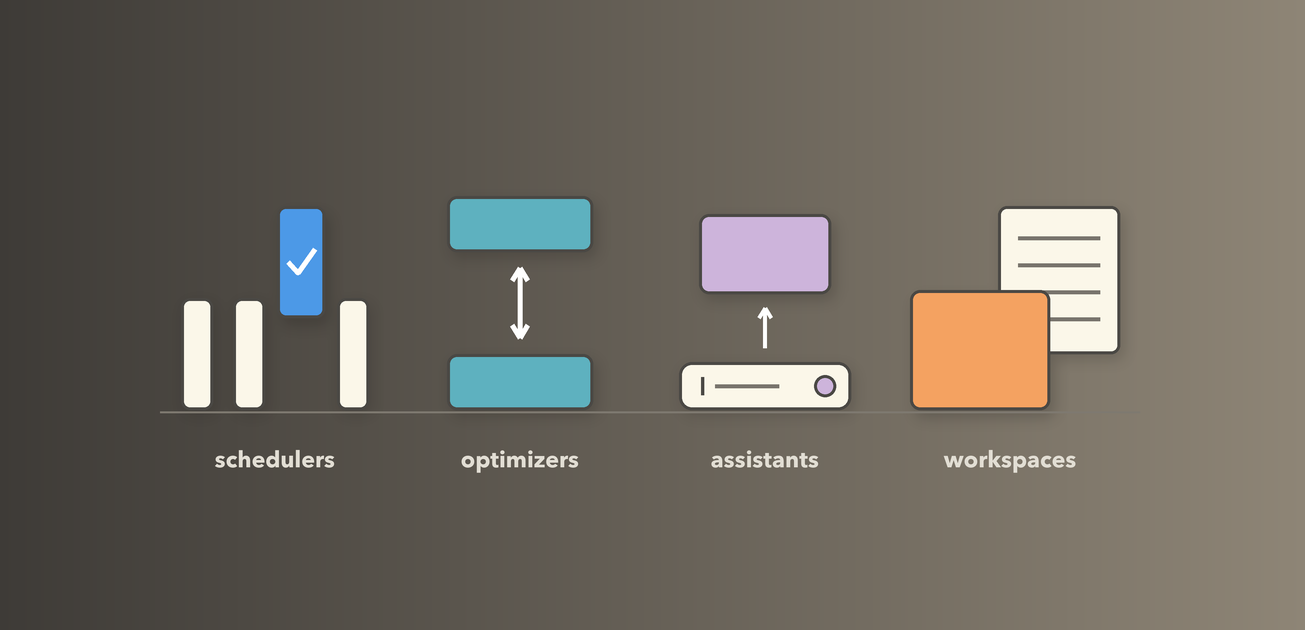
Four genuinely different kinds of software share the label, and they solve four problems that barely overlap:
- Schedulers find and book time with other people.
- Optimizers rearrange the time you already committed to.
- Assistants let you talk to your calendar instead of clicking it.
- Workspaces turn the calendar into the surface where the work itself happens.
The label collapsed for two reasons. Language models made "understands what you typed" table stakes, so every product shipped natural-language entry at once and the feature stopped distinguishing anyone. And all four read the same Google Calendar and Microsoft Graph APIs, so they look alike in screenshots.
What separates them is invisible in a comparison table: the question the product thinks it is answering. A scheduler assumes your problem is coordination, an optimizer that it is defense, an assistant that it is input speed, a workspace that it is context. No feature grid can tell you which one you have.
The four categories
Schedulers: find and book time
What it is for. Booking with people whose calendar you cannot read. You publish availability, someone picks a slot, the event lands on both calendars.
Who it fits. Anyone whose calendar is filled by other people's requests: recruiters, salespeople, consultants, teams routing inbound.
What it does not solve. The shape of your week. It will happily book six 30-minute calls into six separate gaps on a Wednesday, leaving a day made of time confetti, because you never told it what to protect.
The failure mode. Buying one because you feel overbooked. It makes booking easier, which is the opposite of what an overbooked person needs. A recruiter running 18 screens a week is the ideal customer; an engineering manager with 22 internal meetings is not, because none of those 22 started with an availability question.
Optimizers: defend the time you have
What it is for. Rearranging a calendar you already own: moving flexible meetings, extending focus blocks that are about to get squeezed, adding buffers after calls, dropping the things you were never needed at.
Who it fits. People with enough slack in the week to rearrange and enough pressure that nobody else is going to do the rearranging.
What it does not solve. The meetings themselves. An optimizer arranges 25 hours of meetings into a better shape and is structurally incapable of asking whether the recurring Thursday sync should exist. That question belongs to a recurring meeting audit, which is a habit, not a feature.
The failure mode. Not knowing how much authority you handed over until a Thursday when you find that the skip-level you spent two weeks arranging has been moved to make room for a task block.
Assistants: talk to the calendar
What it is for. Compressing input and lookup. "Move my 1:1 with Priya to Thursday afternoon and add 15 minutes." The assistant parses intent, finds the event, writes the change.
Who it fits. Almost everyone at the margin, which is exactly why this is the category most likely to be absorbed rather than bought. Microsoft already ships assistant capability into the calendar its customers pay for, and Google is shipping it across the rest of Workspace.
What it does not solve. Judgment. Being able to move a meeting in one sentence makes it faster to do the thing you should not have done.
The failure mode. Paying a third party for a feature that lands in your existing suite six months later. The honest test: write down the five things you want an assistant to do, then try all five in Google Calendar or Outlook first.
Workspaces: the calendar as an execution surface
What it is for. Attaching the work to the time. Notes, tasks and decisions live on the event rather than in a separate app, so opening a block opens the work rather than a reminder that work exists.
Who it fits. People whose day is calendar-shaped and whose output is knowledge work: managers running many 1:1s, students with a fixed timetable and shifting assignments, anyone who pays a search tax at the start of every meeting.
What it does not solve. External booking, and team-wide automated rearrangement. Those are the scheduler and optimizer categories, and a workspace claiming to do all three well would be lying about at least one.
The failure mode. Buying one when your notes are a grocery list and the occasional phone number. The notes app already on your phone is the correct answer.
The fifth thing people are actually searching for
A meaningful share of people who type "AI calendar app" want a meeting recorder: something that joins the call, transcribes it, and produces a summary. It reads your calendar only to know which calls to join, which makes it a real category and not a calendar app. If what you want is "I stop taking notes in meetings," search for a notetaker.
Who holds the pen
Every optimizer answers one question, and no feature grid asks it. When the software concludes that your Wednesday would be better with the design review at 2:00 instead of 11:00, does it move the meeting, or does it ask you?
Some move it. Motion and Reclaim re-plan in the background: tasks get slotted, blocks get pushed, and the calendar you see at 4:00 is not the calendar you saw at 9:00. That is real leverage, because the re-planning happens whether or not you had the attention to do it yourself. What you give up is predictability.
Some ask. nocal's Ideas surfaces one specific change as a card with a button, and does nothing until you press it. You keep the final say. What you give up is the part that would have happened while you were in a meeting.
Neither is the advanced version of the other. Which one you want depends on what a wrong move costs you.
A staff engineer whose week is six tickets and two standups should want the autonomous kind. Almost every event in play is her own work, and when the software guesses badly she loses an hour on the wrong ticket and moves on.
A director whose Wednesday holds a skip-level, a vendor call and a peer's 1:1 should want the other kind. Those events carry other people's expectations. A meeting that moves itself at 11:40 does not cost twenty minutes. It costs a message from someone senior asking why their meeting moved, and it costs that every single time.
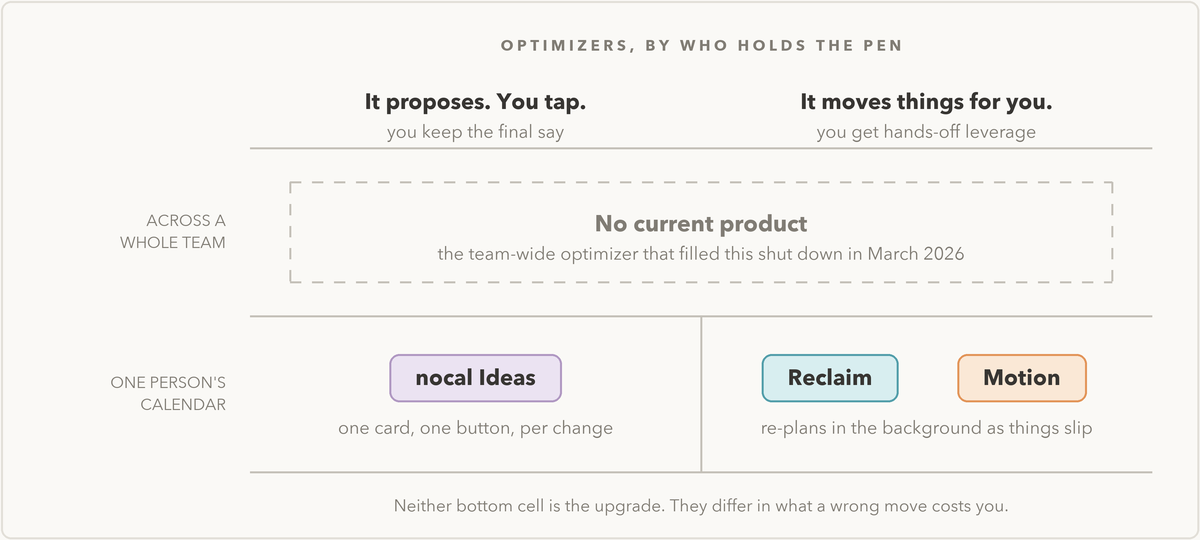
There is a second axis, and it currently has a hole in it. Optimization can run on one person's calendar or across a whole team's, and the team-wide version was by far the more powerful of the two. When enough people in one org ran the same tool, it negotiated across all of them, and everyone's fragments consolidated into the same protected hours.
That product was Clockwise, and it is gone. Salesforce acquihired the team into Agentforce, and Clockwise shut down on March 27, 2026, with roughly a week of notice, and user data was deleted. If you are here because that is the product you lost: most of the migrating user base went to Reclaim, which met it with a price-match offer, and that is still the first place to look. It is not a like-for-like replacement, though. Reclaim optimizes one calendar at a time, and so do Motion and nocal.
That gap should change what you buy. If the outcome you want is "the whole engineering org gets Wednesday mornings back," no product on this page will produce it. Right now that outcome is only reachable as a policy someone enforces.
The comparison
Established players in each category, and where each one stops. Pricing and packaging move faster than this post does, so check anything numeric on the vendor's own site before you commit.
Schedulers
Calendly has the deepest availability logic in the category: buffers, minimum notice, daily caps, round-robin, routing forms. If your booking problem is complicated, it has already met your edge case. Those features sit on different tiers, though: round-robin distribution starts one step above free, and routing forms one step above that. Price it against the specific feature you came for, not the homepage feature list.
Cal.com is the main alternative, and the sentence most comparison posts still write about it is now false. It went closed source in April 2026; the production codebase is private. What remains self-hostable is Cal.diy, which is free and MIT licensed but ships without Teams, Organizations, Workflows, Routing Forms, SSO or Insights, and which the vendor describes as strictly recommended for personal, non-production use. Hosted API access starts at the paid team tier. If self-hosting was your data-ownership plan, that plan needs revisiting before you build on it.
Doodle is still the fastest way to solve the group poll: one slot for nine people who do not share a calendar system. It now also sells booking pages and 1:1 scheduling, so it no longer sits cleanly on the polling side of any line. Two practical notes: creating a poll requires an account now, though voting still does not, and the mobile apps were pulled in July 2026, so treat it as a browser tool.
Built-in booking. Google appointment schedules work on a personal Google account, with the more elaborate options gated behind a paid Workspace or Google plan. Microsoft Bookings is the mirror image: Microsoft lists it for business, enterprise and education plans from Business Basic upward, and for no consumer subscription at all, so a Microsoft 365 Personal or Family subscriber has nothing to switch on. A lot of people who need "a link so clients can book me" are already served on the Google side of that split. Find out which one you have before paying a third party.
Optimizers
Two of these act. One proposes.
Motion is the most aggressive version of acting. Your task list is the input, the calendar is generated output, continuously re-planned as things slip. It is powerful if you will genuinely hand over the pen, and it is priced at the top of the category.
Reclaim works the same problem more conservatively, finding room for tasks and habits and rescheduling them when a meeting lands on top. If you want "two hours on the roadmap doc" to appear and then survive contact with the week, this is the mechanism. Dropbox acquired it in 2024 and it has kept shipping since, which in this category counts for something.
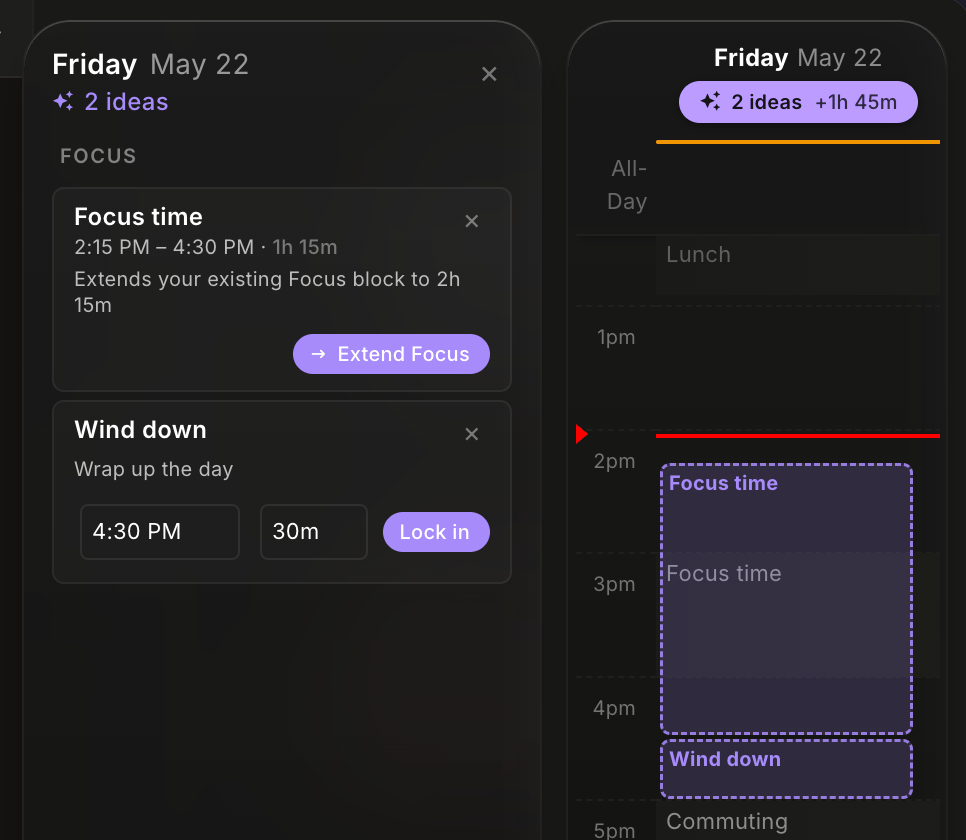
nocal's Ideas is the proposal-based one. It reads the actual day and offers a small number of specific moves: extend a focus block that is about to get squeezed, stack a 1:1 earlier so the afternoon stays whole, decline a meeting you are marked optional on and send the regrets for you, carve out a wind-down block before the day trails off. Every one of them is a card with a button, and nothing on your calendar changes until you press it.
Team-wide. Nobody. Clockwise held this slot until it shut down in March 2026, and no one has filled it since, which is worth knowing before you go looking for the product a two-year-old blog post recommended.
Assistants
Copilot in Outlook is the first thing to check if you are on Microsoft, because it is attached to the calendar you already have open. Its ceiling is not capability. It is your plan and your tenant's settings, which is why two people at the same company can get different answers about what it does.
Google's side needs a caveat rather than a recommendation. Gemini is genuinely across Workspace, but Google's own Workspace AI page names the surfaces as Gmail, Docs, Sheets, Meet and Drive, and Calendar is not on that list. Open your own account and confirm what is actually there before you plan a workflow around an assistant inside Google Calendar specifically.
Fantastical was doing natural-language event entry long before it was an AI feature and still does it with more polish than most. It is an excellent Apple-ecosystem calendar client and it is only that: no task consolidation, no notes workspace.
Workspaces
Sunsama is built around a daily planning ritual that deliberately slows you down: pull today's tasks from your other tools, estimate them, commit. If the missing piece is the act of deciding, that mandatory friction is the product, which is also why people either keep it for years or quit in week two.
Akiflow pulls tasks out of email, Slack, Asana and Jira into one place and time-blocks them. If your commitments live in eleven inboxes, this is the category answer. It is a task surface first and a notes surface a distant second.
Morgen aggregates multiple calendar accounts, connects to external task tools, and adds scheduling links on top. Breadth is its trait and its trade: it is the only one here that does a bit of all four categories, and it is deepest in none of them. We go further into where that breadth earns its price in Morgen alternatives.
Amie has moved, and older reviews will mislead you. It used to be pitched as calendar plus email; the mail client is gone, and it now describes itself as an AI meeting note taker with full calendar integration, with bot-free notes, shareable pages and todos. Judge it on the notes. A fair number of the screenshots still circulating show a product that no longer exists. What changed, and what to use if you wanted the old Amie, is covered in Amie alternatives.
Notion Calendar is right if your work already lives in Notion, because the link back to Notion databases is the entire point. It added Outlook account support in June 2026, so it is no longer effectively Google-only. If your work does not live in Notion, it is a clean free calendar client and not much more. The options for that case are in Notion Calendar alternatives.
The whole thing on one screen
| Category | What it changes | Named here | Where it stops |
|---|---|---|---|
| Scheduler | Who gets onto your calendar | Calendly, Cal.com, Doodle, built-in Google and Microsoft booking | The shape of the week |
| Optimizer, autonomous | Where your events sit, on its own initiative | Motion, Reclaim | Meetings it does not own |
| Optimizer, proposal-based | Where your events sit, once you approve | nocal Ideas | Anything that needs to happen while you are not looking |
| Assistant | How fast you enter and find things | Copilot in Outlook, Fantastical | Judgment |
| Workspace | Where the work attached to a meeting lives | Sunsama, Akiflow, Morgen, Amie, Notion Calendar, nocal | External booking, team-wide rearrangement |
Where nocal fits, and where it does not
nocal sits in two of those rows. It is a workspace, and Ideas is a proposal-based optimizer. The premise behind both is the same: the calendar is the index of your work, so the notes, the tasks and the proposed changes all belong on the events rather than in a second application.
Concretely: a unified inbox across multiple Google and Outlook accounts, so a personal calendar, a work calendar and a client calendar are one surface instead of three tabs. Notes and tasks attached to events. Spaces, which put a project's meetings, notes and tasks on one surface with the tasks in the sidebar. Ideas, which proposes the day's changes and waits. A built-in MCP server, so an outside agent can read your real calendar and read and write your real notes rather than working from a copy. Mac, Windows, iOS and Android.
Now the part these posts usually omit.
If you need a scheduling link for external bookings, nocal is not the answer. Buy Calendly, or check whether the booking feature in the Google or Microsoft account you already have covers it. That is a scheduler problem and it deserves a scheduler.
If you want the calendar rearranged without being asked, nocal is the wrong shape. Ideas waits for the tap on purpose. If you would rather come back from lunch and find the afternoon already re-planned, Motion and Reclaim are built for that, and nocal is not going to grow into it, because the waiting is the design and not a missing feature.
If you need focus time defended across a whole team, nobody can do that right now, including us. Ideas works on your calendar. It does not negotiate across a team's calendars or move other people's meetings.
If you need a project management platform, this is not one. There are no Gantt charts and no team boards. Spaces hold a project's meetings, notes and tasks; they do not run a program.
If your notes are short and personal, you do not need this category at all. Apple Notes plus the calendar you already have is a legitimate, free, correct answer for a lot of people.
The free tier is desktop-only with one space. Starter is $4.99 a month. Free for students with a .edu address, covered on the students page.
How to choose: five questions
Answer in order. The first "yes" routes you.
1. Is your calendar filled mostly by people outside your organization? You need a scheduler. Start with whatever booking feature your existing account already includes, and upgrade when you hit its limits.
2. Is the problem the shape of your week rather than the number of things in it? You want an optimizer, and then one follow-up. If the events that need to move are mostly your own work, buy an autonomous one and let it run. If they are mostly other people's meetings, buy a proposal-based one, because the cost of a wrong automatic move is a conversation, not an hour.
3. Is your real complaint that entering and finding things is slow? You want an assistant, and you should exhaust what Google or Microsoft already gives you before paying anyone else.
4. When a meeting starts, do you spend the first several minutes finding the relevant notes or doc? That is the workspace problem, and the one that compounds most quietly. Count it for a week. If you are losing more than 20 minutes a day at the top of blocks, the category pays for itself.
5. Is your honest answer "there are simply too many meetings"? No category here solves that. Run a recurring meeting audit first, then buy software for whatever is left.
Frequently asked questions
Do I need an AI calendar app at all? Many people need a better weekly habit more than a better tool. If you do not spend 20 minutes at the end of each week reviewing what happened and deciding what next week is for, do that for a month first. A weekly note in a plain text file plus the calendar you already own beats an unused subscription. These tools make a good weekly practice faster. None of them create one.
What happens if the product I buy shuts down? Plan for it, because it happens in this category. Clockwise, the best team-wide optimizer on the market, was sunset in March 2026 with about a week of notice, and user data was deleted. Two protections cost you nothing. First, prefer tools that write real events into your Google or Microsoft calendar rather than holding the schedule only on their own servers: when the events are genuinely yours, a shutdown costs you a feature instead of your calendar. Second, before you commit, find out how you would export whatever the tool holds that your calendar does not, which for a workspace means the notes. If the answer is "open a support ticket," you have your answer.
Will Google and Microsoft just absorb this category? Partly, and that is the correct way to plan. Assistants are the most exposed, since natural-language creation, summarization and find-a-time are features the suites can ship free to people already paying. Schedulers are exposed at the low end and safe at the high end, where complex routing and round-robin are real products. Optimizers and workspaces are least exposed, because both require opinionated decisions about how someone should work, and platform vendors are reluctant to be opinionated for hundreds of millions of users. Practical rule: do not pay a third party for what your suite already does; do pay for what it has declined to have a point of view about.
What about privacy and giving an app access to my calendar? Take this seriously. Titles and attendee lists disclose which vendors you are evaluating, which recruiters you are meeting, and when a reorg is happening: closer to an org chart plus a diary than a list of appointments. Four questions before granting access:
- What scopes does it request? Read-only free/busy is very different from read/write access to event bodies and attendee lists. Many tools ask for more than they need.
- Is content used for model training? Look for an explicit statement, not an absence of one. If the policy does not answer clearly, treat that as the answer.
- Does anything leave the vendor? If a feature calls a third-party model provider, your event titles go somewhere the vendor does not own. Vendors doing this responsibly say so plainly.
- How do you revoke it? Revoke from the account you connected, not from the app: third-party access in Google account settings, or app permissions in Microsoft 365. Deleting the app revokes nothing.
If you are in a regulated industry or under a company IT policy, ask before installing, not after.
Free versus paid: what actually changes? Free tiers are limited on three axes: connected accounts, mobile access, and sync, which are the three things costing the vendor money per user per day. Judge one by whether it lets you test the core mechanism, not by whether it is usable forever: if it will not connect the second calendar account and that account is the entire reason you were shopping, it cannot answer your question. One related trap is buying annual on day one for the discount. Every product here is a habit change, and habit changes fail in weeks three and four. Pay monthly until you have survived a genuinely bad week, which is the only week in which these tools differ from each other.
Closing thought
These searches end in an uninstall almost never because the product was bad, but because the buyer never named the problem precisely enough to be sold the right thing.
Name yours first. The decision gets much smaller after that.
To test the workspace category, the cheapest experiment installs nothing: for one week, write the relevant context into the description field of every meeting before it starts, and count the minutes you save at the top of each block. If the number is meaningful, go pick a product. If not, you have saved a subscription. When notes and tasks live on the event itself, as they do in nocal, that week stops being an experiment you maintain by hand.
 Download for Mac
 Download for Windows
 Google Play Store