Notion Calendar Alternatives: 5 Options Compared for 2026
Notion Calendar is free but stores nothing of its own. Five alternatives for 2026: which have note-taking, which support Outlook and iCloud, and prices.
Updated August 4, 2026
Notion Calendar is free and hard to beat on price, so the reason to leave is almost always that it has no notes or tasks of its own. It is a window onto Notion. nocal is the closest free replacement that adds a full markdown notes app to the calendar, for Google and Outlook accounts.
Your team already runs on Notion. Nothing here replaces having your Notion database items sitting on your calendar, and Notion Calendar is free, well built, and connects to iCloud, which nocal does not.
Notion Calendar is a good free calendar, and most people looking for an alternative aren't complaining about it. They've run into its one structural limit: it doesn't store anything. No note-taking, no task management of its own. It displays items that live in Notion.
If you do not use Notion, that leaves you with a nicely built calendar and nowhere to write.
At a glance
 Notion CalendarFreeGoogle, Outlook, Apple/iCloudMac, Windows, iOS, AndroidNone of its own. Surfaces Notion itemsNotion pages only, no calendar
 nocalFree on desktop; $4.99/mo mobile; $9.99/mo fullGoogle, Microsoft 365/OutlookMac, Windows, iOS, AndroidFull markdown notes; tasks live in notesNotes: search, read, create, update
 Morgen$30/mo, or $15/mo billed yearlyGoogle, Outlook/M365, iCloud, Fastmail, CalDAVMac, Windows, Linux, iOS, Android, webNo notes; integrates 8 task toolsNone; REST API only
 Amie$25/mo, or $20 billed yearly. Only paid plans listedGoogle accounts; Outlook only via its Apple Calendar integrationMac, Windows, iPhone. No AndroidAI meeting recording and transcriptsCalendar, todos, contacts, notes
 Google CalendarFreeGoogleEverywhereNoneNoneNotion Calendar
- Price
- Free
- Calendar accounts
- Google, Outlook, Apple/iCloud
- Platforms
- Mac, Windows, iOS, Android
- Notes and tasks
- None of its own. Surfaces Notion items
- MCP server
- Notion pages only, no calendar
nocal- Price
- Free on desktop; $4.99/mo mobile; $9.99/mo full
- Calendar accounts
- Google, Microsoft 365/Outlook
- Platforms
- Mac, Windows, iOS, Android
- Notes and tasks
- Full markdown notes; tasks live in notes
- MCP server
- Notes: search, read, create, update
Morgen- Price
- $30/mo, or $15/mo billed yearly
- Calendar accounts
- Google, Outlook/M365, iCloud, Fastmail, CalDAV
- Platforms
- Mac, Windows, Linux, iOS, Android, web
- Notes and tasks
- No notes; integrates 8 task tools
- MCP server
- None; REST API only
Amie- Price
- $25/mo, or $20 billed yearly. Only paid plans listed
- Calendar accounts
- Google accounts; Outlook only via its Apple Calendar integration
- Platforms
- Mac, Windows, iPhone. No Android
- Notes and tasks
- AI meeting recording and transcripts
- MCP server
- Calendar, todos, contacts, notes
Google Calendar- Price
- Free
- Calendar accounts
- Platforms
- Everywhere
- Notes and tasks
- None
- MCP server
- None
Checked 3 August 2026 against each vendor's own pages: Notion Calendar, Morgen, Amie pricing and FAQ, Amie downloads.
What Notion Calendar is
Worth stating precisely, because the marketing blurs it. Notion Calendar connects to Google, Outlook, and Apple iCloud, runs on Mac, Windows, iPhone, and Android, and costs nothing. Alongside your events it can show Notion database items, and you can drag to reschedule them without leaving the calendar.
Notion's own FAQ confirms the integration is one-directional: you can view Notion items beside Google Calendar events, but importing Google Calendar events into Notion databases is not possible. So it is a calendar with a Notion viewport, not a two-way sync.
That is a fine product. It is only a problem if you expected it to be your notes app.
Why choose nocal
nocal is the inverse trade. Where Notion Calendar shows you items stored elsewhere, nocal stores them.
Every meeting can carry a full markdown note. Every week gets one weekly note that carries forward. Notes hold checklists, tables, and @-mentions that link another note or an event inline, sit in folders and spaces with templates like PARA, and a single search covers your notes and your events together.
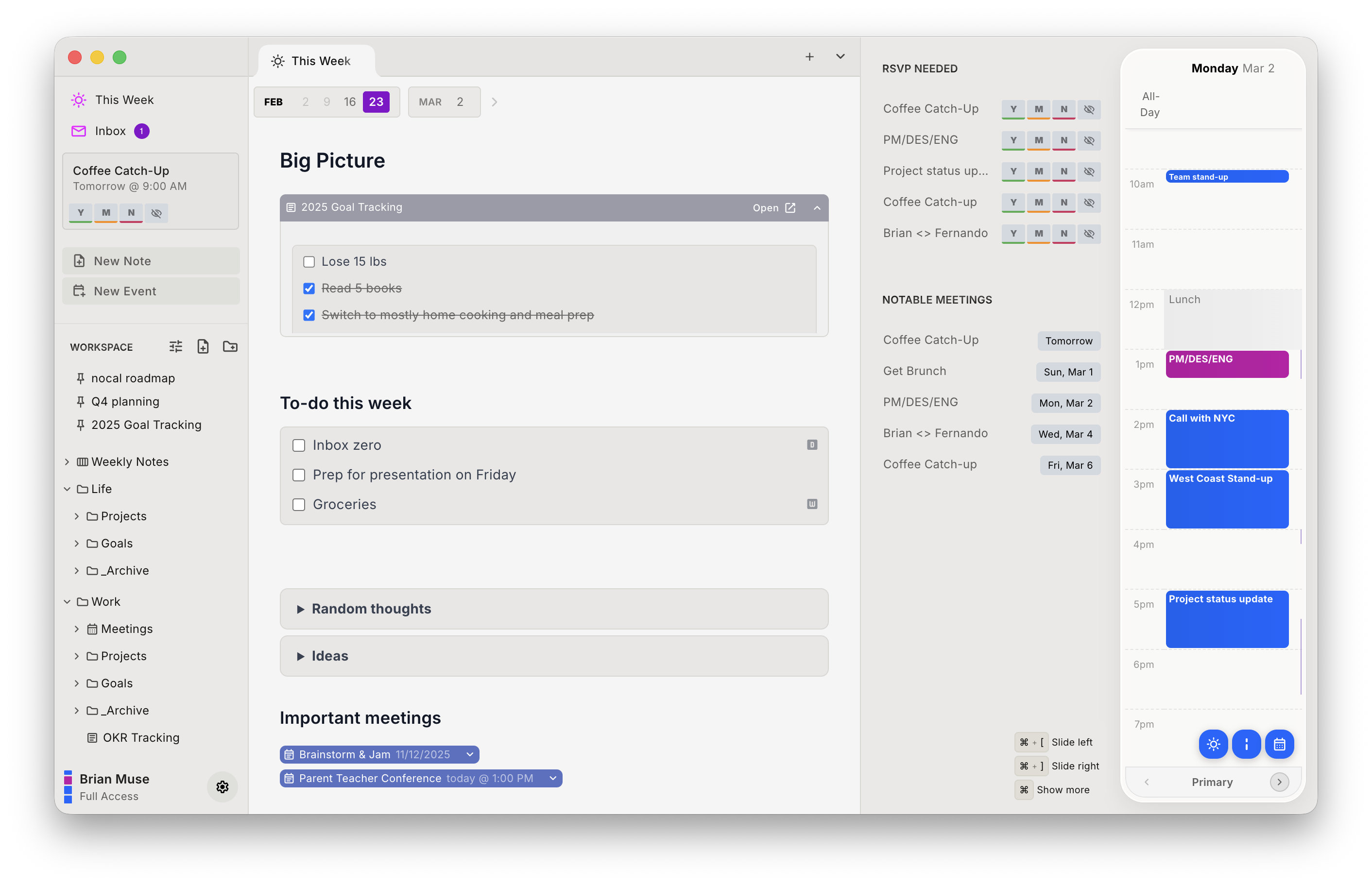
It also ships a built-in MCP server: Claude, ChatGPT, and Cursor can search, read, create, and conflict-safely update your notes. Notion has one too, covering your workspace pages, so if you put your second brain in Notion partly so an AI could reach it, the question is which side you want the agent writing into. Neither exposes calendar tools. It also scores incoming invites for spam and lets you delete a bad one without notifying the sender.
Like Notion Calendar, the entry price is free. nocal's desktop tier on Mac and Windows includes full Google and Outlook management and unlimited notes, permanently. Mobile is $4.99/mo and full access $9.99/mo, and that is the gap with Notion Calendar, whose mobile apps are free.
| Strengths | Weaknesses |
|---|---|
| Real markdown notes attached to events | No Apple or iCloud support (Notion Calendar has it) |
| Free desktop tier with unlimited notes | Mobile requires a paid tier, while Notion Calendar's is free |
| MCP server for AI agents, read and write | No Notion integration (it replaces Notion, not extends it) |
| Search covers notes and events at once | No Linux |
| Calendar Ideas proposes focus blocks and declines | Smaller ecosystem than Notion |
Pick nocal if you are on Google or Microsoft and you want one place that holds both the schedule and the writing. Skip it if your team's knowledge base is Notion and moving it is not on the table.
Other options
If nocal isn't the fit, here are the rest, including the one that lets you keep Notion as the store and replace only the calendar.
Morgen: best for calendar coverage and scheduling tasks
If your issue with Notion Calendar is that it doesn't do enough with your time, Morgen is the upgrade. AI time blocking, booking pages, automations, and the broadest provider support anywhere: Google, Outlook/Microsoft 365, iCloud, Fastmail, and CalDAV, plus a Linux desktop app.
Critically for this comparison, Morgen integrates with Notion for tasks, along with Todoist, Linear, ClickUp, Obsidian, Google Tasks, Microsoft To-Do, and Zoho. So you can keep Notion as the store and get a far more capable scheduler on top.
It's the most expensive option here at $30/mo, or $15/mo billed annually, after a 14-day trial.
Pick Morgen if you want to keep Notion and replace only the calendar.
Amie: best for meeting capture
Amie brings bot-free AI meeting recording, transcription, and summaries, wrapped in the best-looking interface in the category. It's the only option here that writes the notes for you.
Two caveats, coming from a free product. The pricing page lists only paid plans: $25/mo, or $20 billed yearly, after a 7-day trial. Its calendar support is also narrower. Amie's FAQ says Google accounts, with Outlook only "through our Apple Calendar integration," and there's no Android app.
If you want the meeting written up without typing, Amie is the one that does it.
Google Calendar: best if free is the whole requirement
Notion Calendar's main appeal is that it's free and better looking than Google Calendar. If you're leaving Notion Calendar and the Notion connection was never the point, the plain Google Calendar web and mobile apps cost nothing and lose very little.
Sunsama: best for deciding what fits
Sunsama won't auto-schedule anything. It runs a guided daily planning ritual that pulls in tasks (including from Notion) and asks you to commit to a realistic day. It's priced at a premium, and the value is entirely in whether you keep doing the ritual.
Sunsama fits when the problem is overcommitment, not a lack of tools.
Switching from Notion Calendar to nocal
Your events stay where they are. Both apps are just clients on top of Google and Microsoft.
- Install nocal on Mac or Windows and connect your Google or Microsoft account. The free desktop tier covers one account; merging several needs Full Access at $9.99/mo.
- Start with the weekly note. It's the habit that makes the rest make sense.
- Attach notes to your recurring meetings as they come up rather than migrating everything at once.
Two things to plan for. iCloud accounts cannot be connected, so if any of your calendars are Apple-hosted, nocal cannot see them. And there is no Notion integration. Your Notion database items will not appear on the nocal calendar. This is a replacement for that workflow, not a bridge to it.
FAQ
Does Notion Calendar have note-taking? No. Notion Calendar has no note-taking or task management of its own. It displays items from Notion databases beside your events. Per Notion's FAQ, the integration is one-way: Google Calendar events cannot be imported into Notion databases.
Is there a free alternative to Notion Calendar? Yes. nocal is free on Mac and Windows with full Google and Outlook management and unlimited notes, and Google Calendar is free everywhere. Note that nocal's mobile apps require the $4.99/mo tier, while Notion Calendar's are free.
Which Notion Calendar alternative supports iCloud? Morgen connects to iCloud directly, along with Google, Outlook, Fastmail, and CalDAV. Amie reaches Apple calendars through its Apple Calendar integration on macOS. nocal doesn't support iCloud at all. It's Google and Microsoft 365/Outlook only.
What is the best Notion Calendar alternative with built-in notes? nocal, if your calendars are on Google or Microsoft. Notes are the primary object rather than a linked database row: markdown, folders, @-mention links to notes and events, a weekly note, and a note per meeting, all searchable alongside your events.
Can I keep using Notion and just replace the calendar? Yes. Morgen integrates with Notion for tasks while giving you far more scheduling capability, so Notion stays the store and Morgen becomes the calendar.
Do any of these let AI agents read my notes and calendar? Notes, yes; calendars, mostly not. nocal's built-in MCP server covers notes: search, read, create, and update, with conflict-safe writes. Notion ships one for your workspace pages, with no calendar tools. Amie's reaches calendar events, todos, and contacts. Morgen and Google Calendar expose none.
 Download for Mac
 Download for Windows
 Google Play Store