Google Calendar Alternatives: 5 Options Compared for 2026
Google Calendar is free but has no notes and no real desktop app. Five alternatives for 2026: which add notes, which run natively on your Mac, and prices.
Updated August 14, 2026
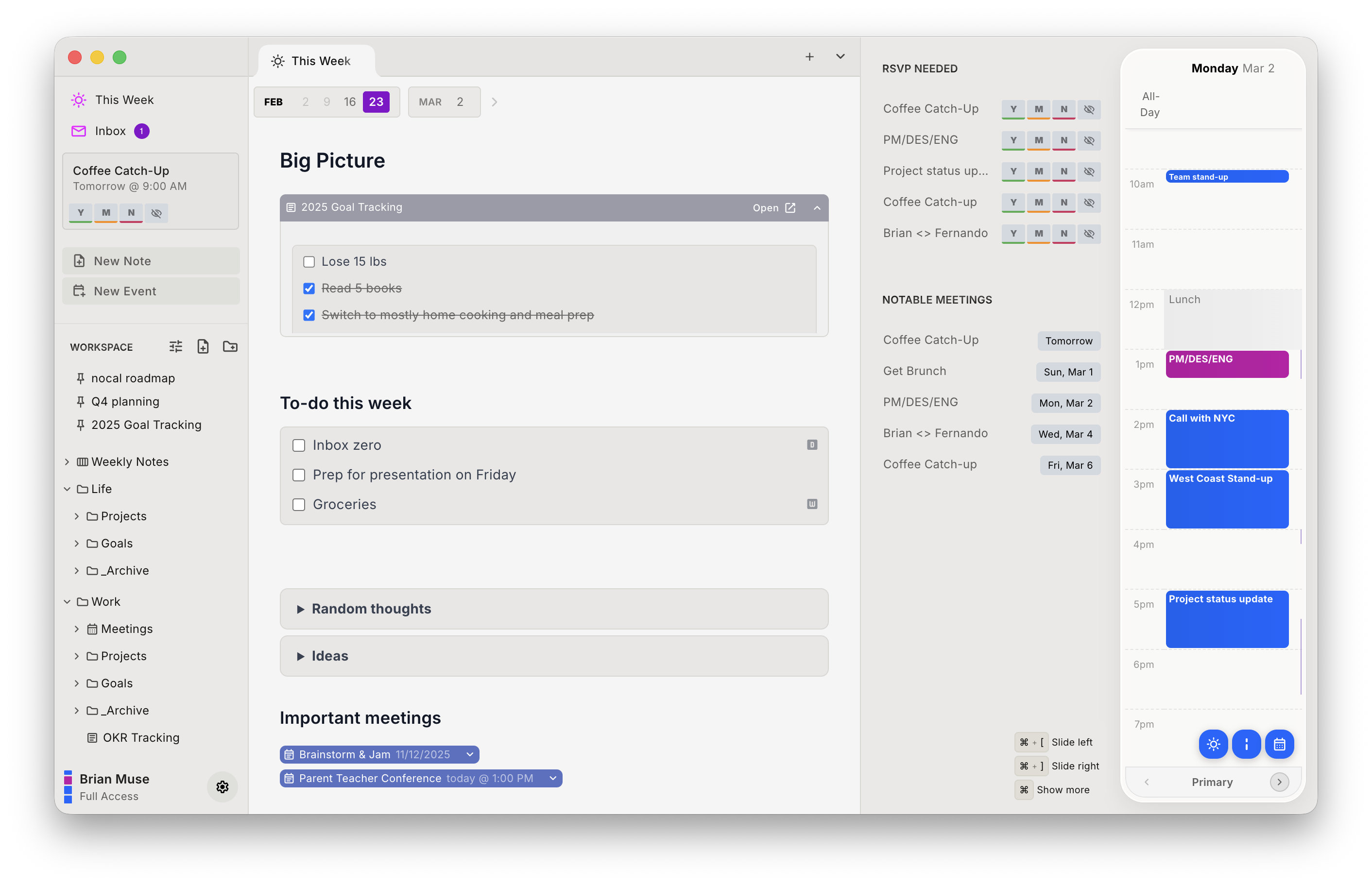
Google Calendar is free, syncs everywhere, and now has a first-party AI and MCP, so people looking for an alternative are rarely unhappy with the calendar itself. They want two things it doesn't do: hold notes, and run as a real app instead of a browser tab. nocal is a native Mac and Windows app that sits on the same Google account and attaches a full markdown note to every meeting.
The browser is fine and you don't want a notes layer. Google Calendar is free, plugs straight into Gmail and Meet, and now ships Gemini scheduling and a first-party calendar MCP, so if you want an AI managing your events, Google already does that natively. Note too that nocal reads your Google events but does not replace Google as the place they live.
Google Calendar is the calendar most of the world already uses, and most people searching for an alternative aren't trying to leave it. They've hit one of its two structural gaps: it stores no notes of its own, and on a computer it's a browser tab, not an app.
"Alternative" is a slightly odd word here. Google Calendar is a store: your events live in Google's cloud, and every good client is just a window onto them. The real question is which window is better, and whether it can add the things Google leaves out.
At a glance
 Google CalendarFree; extras bundled with Google Workspace ($7+/user/mo)GoogleWeb, Android, iOS. No native Mac or Windows appGoogle Tasks; notes live in Keep, a separate appFirst-party calendar MCP; Gemini scheduling (paid plans)
 nocalFree on desktop; $4.99/mo mobile; $9.99/mo fullGoogle, Microsoft 365/OutlookMac, Windows, iOS, AndroidFull markdown notes; tasks live in notesNotes: search, read, create, update
 Fantastical$6.99/mo Premium; free tier availableGoogle, iCloud, Microsoft 365/Exchange, CalDAV, TodoistMac, Windows, iPhone, iPad, Watch, Vision Pro. No AndroidTask management; syncs Reminders/Todoist. No notes appCalendar MCP (Fantastical Connector)
 Morgen$30/mo, or $15/mo billed yearlyGoogle, Outlook/M365, iCloud, Fastmail, CalDAVMac, Windows, Linux, iOS, Android, webNo notes; integrates 8 task toolsNone; REST API only
 Apple CalendarFreeiCloud, Google, Exchange, CalDAVMac, iPhone, iPad, Watch, Vision Pro, web. No Windows/AndroidReminders and Notes are separate appsNoneGoogle Calendar
- Price
- Free; extras bundled with Google Workspace ($7+/user/mo)
- Calendar accounts
- Platforms
- Web, Android, iOS. No native Mac or Windows app
- Notes and tasks
- Google Tasks; notes live in Keep, a separate app
- MCP server
- First-party calendar MCP; Gemini scheduling (paid plans)
nocal- Price
- Free on desktop; $4.99/mo mobile; $9.99/mo full
- Calendar accounts
- Google, Microsoft 365/Outlook
- Platforms
- Mac, Windows, iOS, Android
- Notes and tasks
- Full markdown notes; tasks live in notes
- MCP server
- Notes: search, read, create, update
Fantastical- Price
- $6.99/mo Premium; free tier available
- Calendar accounts
- Google, iCloud, Microsoft 365/Exchange, CalDAV, Todoist
- Platforms
- Mac, Windows, iPhone, iPad, Watch, Vision Pro. No Android
- Notes and tasks
- Task management; syncs Reminders/Todoist. No notes app
- MCP server
- Calendar MCP (Fantastical Connector)
Morgen- Price
- $30/mo, or $15/mo billed yearly
- Calendar accounts
- Google, Outlook/M365, iCloud, Fastmail, CalDAV
- Platforms
- Mac, Windows, Linux, iOS, Android, web
- Notes and tasks
- No notes; integrates 8 task tools
- MCP server
- None; REST API only
Apple Calendar- Price
- Free
- Calendar accounts
- iCloud, Google, Exchange, CalDAV
- Platforms
- Mac, iPhone, iPad, Watch, Vision Pro, web. No Windows/Android
- Notes and tasks
- Reminders and Notes are separate apps
- MCP server
- None
Checked 14 August 2026 against each vendor's own pages: Google Workspace pricing, Google's note that Calendar can't be installed on a computer, Fantastical, Morgen, and Apple Calendar.
What Google Calendar is
A free, reliable cloud calendar tied to your Google account. It runs in any browser, has first-class Android and iOS apps, and connects to nothing but Google. That last point surprises people: Google Calendar shows Google calendars. It is not a hub that pulls in Outlook or iCloud the way some clients are.
It deliberately leaves out two things. There's no desktop app: Google's own support page states you can't install Calendar on your computer, so on a Mac or PC it's a browser tab. And it holds no notes. Tasks exist through Google Tasks, and note-taking lives in Google Keep, a separate app that doesn't sit on the calendar.
Recently Google added the AI layer. Gemini can propose meeting times in Gmail and Calendar (on paid plans), and Google runs a first-party calendar MCP endpoint that agents like Claude can call to read and manage events. If AI-on-the-calendar is what you're after, Google now does it natively.
Why choose nocal
nocal keeps Google as the store and replaces the window. You connect the same Google account and your events are the same events, but now there's an app around them, and the app can write.
Every meeting can carry a full markdown note. Every week gets one weekly note that carries forward. Notes hold checklists, tables, and @-mentions that link another note or an event inline, sit in folders and spaces with templates like PARA, and a single search covers your notes and your events together. It's a real Mac and Windows app rather than a browser tab, with iOS and Android alongside.
nocal ships a built-in MCP server too, pointed at a different target than Google's. Google's MCP manages your calendar; nocal's covers your notes, so Claude, ChatGPT, and Cursor can search, read, create, and conflict-safely update them. They cover different things: keep Google's calendar tools, and add an agent that can write into your notes. nocal also scores incoming invites for spam and lets you delete a bad one without notifying the sender.
Like Google Calendar, the entry price is free. nocal's desktop tier on Mac and Windows includes full Google (and Outlook) management and unlimited notes, permanently. Mobile is $4.99/mo and merging several accounts is $9.99/mo. That's the one place Google is cheaper: its mobile apps are free.
| Strengths | Weaknesses |
|---|---|
| Real markdown notes attached to your Google events | Mobile requires a paid tier; Google's is free |
| Native Mac and Windows app, not a browser tab | No iCloud (Google Calendar app doesn't have it either, but Apple Calendar does) |
| MCP server for AI agents, read and write, over notes | No calendar MCP; Google's own covers events |
| Search covers notes and events at once | Smaller ecosystem than Google/Gmail/Meet |
| Calendar Ideas proposes focus blocks and declines | Adds Outlook, but no Linux or web app |
Pick nocal if you're on Google (or Microsoft) and you want one native place that holds both the schedule and the writing. Skip it if the browser is enough and you don't want a notes layer.
Other options
If a notes-on-the-calendar app isn't the point, here are the rest.
Fantastical: best for scheduling and natural-language entry
Fantastical is the polished power-user client. Type "lunch with Sam Thursday 1pm" and it parses it; its Openings and Proposals tools handle availability sharing and multi-time suggestions better than anything here. It connects to Google, iCloud, Microsoft, and CalDAV, and it has its own calendar MCP. The catches: it's $6.99/mo for Premium, it has no real notes app, and there's no Android.
Morgen: best for calendar coverage and scheduling tasks
If your issue with Google Calendar is that it doesn't do enough with your time, Morgen adds AI time blocking, booking pages, and the broadest provider support anywhere: Google, Outlook/Microsoft 365, iCloud, Fastmail, and CalDAV, plus the only Linux desktop app in the category. It integrates tasks from eight tools but stores no notes of its own, and it's the priciest option at $30/mo ($15/mo billed yearly).
Apple Calendar: best if you're all-in on Apple
If you're leaving the Google Calendar app but not Google the account, Apple Calendar can add your Google account alongside iCloud and Exchange and give you a free, native client across Mac, iPhone, iPad, and Watch, with Apple Intelligence now detecting event details in Mail and Messages. No Windows or Android, and notes and reminders stay in their own apps.
Switching from the Google Calendar app to nocal
There's nothing to migrate. Your events never move; both apps are just clients on top of your Google account.
- Install nocal on Mac or Windows and connect the same Google account. The free desktop tier covers one account; merging several needs Full Access at $9.99/mo.
- Start with the weekly note. It's the habit that makes the rest make sense.
- Attach notes to your recurring meetings as they come up rather than migrating everything at once.
One thing to know: nocal connects Google and Microsoft 365/Outlook only. If some of your calendars are on iCloud, nocal can't see those, but your Google calendars come across in full.
FAQ
Is there a free alternative to Google Calendar? Yes. nocal is free on Mac and Windows with full Google (and Outlook) management and unlimited notes. Apple Calendar is free too, if you're on Apple hardware. Note that nocal's mobile apps require the $4.99/mo tier, while Google's are free.
Does Google Calendar have a desktop app? No. Google's own support page says Calendar can't be installed on a computer; on a Mac or PC it runs in the browser (with an offline mode). nocal is a native Mac and Windows app that connects to the same Google account.
Does Google Calendar have note-taking? Not on the calendar. Tasks come through Google Tasks, and notes live in Google Keep, a separate app. nocal attaches a full markdown note to every meeting and keeps a weekly note, all searchable alongside your events.
Can an AI agent manage my Google Calendar? Yes. Google runs a first-party calendar MCP that agents like Claude can call, and Gemini proposes times on paid plans. nocal's MCP is aimed at notes rather than the calendar: agents can search, read, create, and update notes, conflict-safely.
Which Google Calendar alternative also handles Outlook? nocal connects Google and Microsoft 365/Outlook together on one timeline. Morgen and Fantastical go further, adding iCloud and CalDAV; Apple Calendar adds Google and Exchange but only on Apple devices.
Can I keep using Google Calendar and just get notes? That's exactly what nocal is. It doesn't replace Google as the store; it connects the same account and adds the notes app and native desktop client Google leaves out.
 Download for Mac
 Download for Windows
 Google Play Store