Apple Calendar Alternatives: 5 Options Compared for 2026
Apple Calendar is free and native, but keeps notes in a separate app and runs on nothing outside Apple. Five alternatives for 2026, and the iCloud catch to know first.
Updated August 14, 2026
Apple Calendar is free, built into every Apple device, and aggregates iCloud, Google, and Exchange in one place, but it keeps notes and reminders in separate apps and runs on nothing outside Apple. nocal only helps if your calendars are on Google or Microsoft: it can't connect iCloud at all. For those accounts it adds a markdown note to every meeting and runs on Windows and Android too.
Any of your calendars live in iCloud. nocal cannot connect Apple or iCloud accounts (only Google and Microsoft 365), so if that's where your events are, Apple Calendar is the honest answer and nothing here replaces it. Stay too if you want everything free and native across Mac, iPhone, iPad, and Watch, with Apple Intelligence detecting events in Mail and Messages, and no extra app to install.
Apple Calendar is free, already on every Apple device, and reliable at the one job most people need: showing iCloud, Google, and Exchange calendars together in one place. People look for an alternative when they want notes attached to their meetings, or when they need the calendar on a Windows PC or an Android phone, where Apple Calendar doesn't go.
One thing to settle before the list, because it decides whether any of this applies to you.
The iCloud catch, first
nocal, the app behind this page, cannot connect iCloud or Apple accounts. It works with Google and Microsoft 365/Outlook only. So if your calendars live in iCloud, nocal can't see them, and it isn't your alternative. The other options below (Morgen, Fantastical, Apple Calendar itself) do support iCloud, and that's where to look.
nocal fits one specific case: your events are actually in Google or Microsoft, and you've been using Apple Calendar mainly as the app that displays them. If that's you, read on. If your calendars are iCloud-hosted, skip to the other options.
At a glance
 Apple CalendarFree, built iniCloud, Google, Exchange, CalDAVMac, iPhone, iPad, Watch, Vision Pro, web. No Windows/AndroidReminders and Notes live in separate apps; no note on an eventNone; local EventKit access only
 nocalFree on desktop; $4.99/mo mobile; $9.99/mo fullGoogle, Microsoft 365/Outlook. No iCloudMac, Windows, iOS, AndroidFull markdown notes; tasks live in notesNotes: search, read, create, update
 Fantastical$6.99/mo Premium; free tier availableGoogle, iCloud, Microsoft 365/Exchange, CalDAV, TodoistMac, Windows, iPhone, iPad, Watch, Vision Pro. No AndroidTask management; syncs Reminders/Todoist. No notes appCalendar MCP (Fantastical Connector)
 Morgen$30/mo, or $15/mo billed yearlyGoogle, Outlook/M365, iCloud, Fastmail, CalDAVMac, Windows, Linux, iOS, Android, webNo notes; integrates 8 task toolsNone; REST API only
 Google CalendarFreeGoogleWeb, Android, iOS. No native desktop appGoogle Tasks; notes in KeepFirst-party calendar MCP; Gemini scheduling (paid)Apple Calendar
- Price
- Free, built in
- Calendar accounts
- iCloud, Google, Exchange, CalDAV
- Platforms
- Mac, iPhone, iPad, Watch, Vision Pro, web. No Windows/Android
- Notes and tasks
- Reminders and Notes live in separate apps; no note on an event
- MCP server
- None; local EventKit access only
nocal- Price
- Free on desktop; $4.99/mo mobile; $9.99/mo full
- Calendar accounts
- Google, Microsoft 365/Outlook. No iCloud
- Platforms
- Mac, Windows, iOS, Android
- Notes and tasks
- Full markdown notes; tasks live in notes
- MCP server
- Notes: search, read, create, update
Fantastical- Price
- $6.99/mo Premium; free tier available
- Calendar accounts
- Google, iCloud, Microsoft 365/Exchange, CalDAV, Todoist
- Platforms
- Mac, Windows, iPhone, iPad, Watch, Vision Pro. No Android
- Notes and tasks
- Task management; syncs Reminders/Todoist. No notes app
- MCP server
- Calendar MCP (Fantastical Connector)
Morgen- Price
- $30/mo, or $15/mo billed yearly
- Calendar accounts
- Google, Outlook/M365, iCloud, Fastmail, CalDAV
- Platforms
- Mac, Windows, Linux, iOS, Android, web
- Notes and tasks
- No notes; integrates 8 task tools
- MCP server
- None; REST API only
Google Calendar- Price
- Free
- Calendar accounts
- Platforms
- Web, Android, iOS. No native desktop app
- Notes and tasks
- Google Tasks; notes in Keep
- MCP server
- First-party calendar MCP; Gemini scheduling (paid)
Checked 14 August 2026 against each vendor's own pages: Apple Calendar, Fantastical, Morgen, and Google Workspace pricing.
What Apple Calendar is
The calendar app built into macOS, iOS, iPadOS, watchOS, and visionOS, with a web version at iCloud.com. It's free, it syncs through iCloud, and it aggregates accounts: alongside iCloud you can add Google, Microsoft Exchange (covering Outlook.com and Microsoft 365), and generic CalDAV, and see them all on one grid.
It isn't a writing tool. Notes live in Apple Notes and tasks in Apple Reminders, both separate apps. Scheduled reminders do surface in Calendar's day view, but there's nowhere to write a full note on an event. Under the hood these apps share Apple's EventKit data layer, but there's no MCP server or public web API; programmatic access is local, through EventKit on the device. In the iOS 26 line, Apple Intelligence detects event details in Mail, Messages, and screenshots and offers a pre-filled event, and Siri can create events by voice.
And it runs on Apple only. No Windows app (iCloud calendars sync into Outlook via iCloud for Windows), no Android.
Why choose nocal
Only relevant if your calendars are on Google or Microsoft. But if they are, nocal turns the calendar into something Apple Calendar deliberately keeps separate: a place to write.
Every meeting can carry a full markdown note. Every week gets one weekly note that carries forward. Notes hold checklists, tables, and @-mentions that link another note or an event inline, sit in folders and spaces with templates like PARA, and a single search covers your notes and your events together. Where Apple keeps Calendar, Notes, and Reminders in three apps, nocal puts the writing on the event.
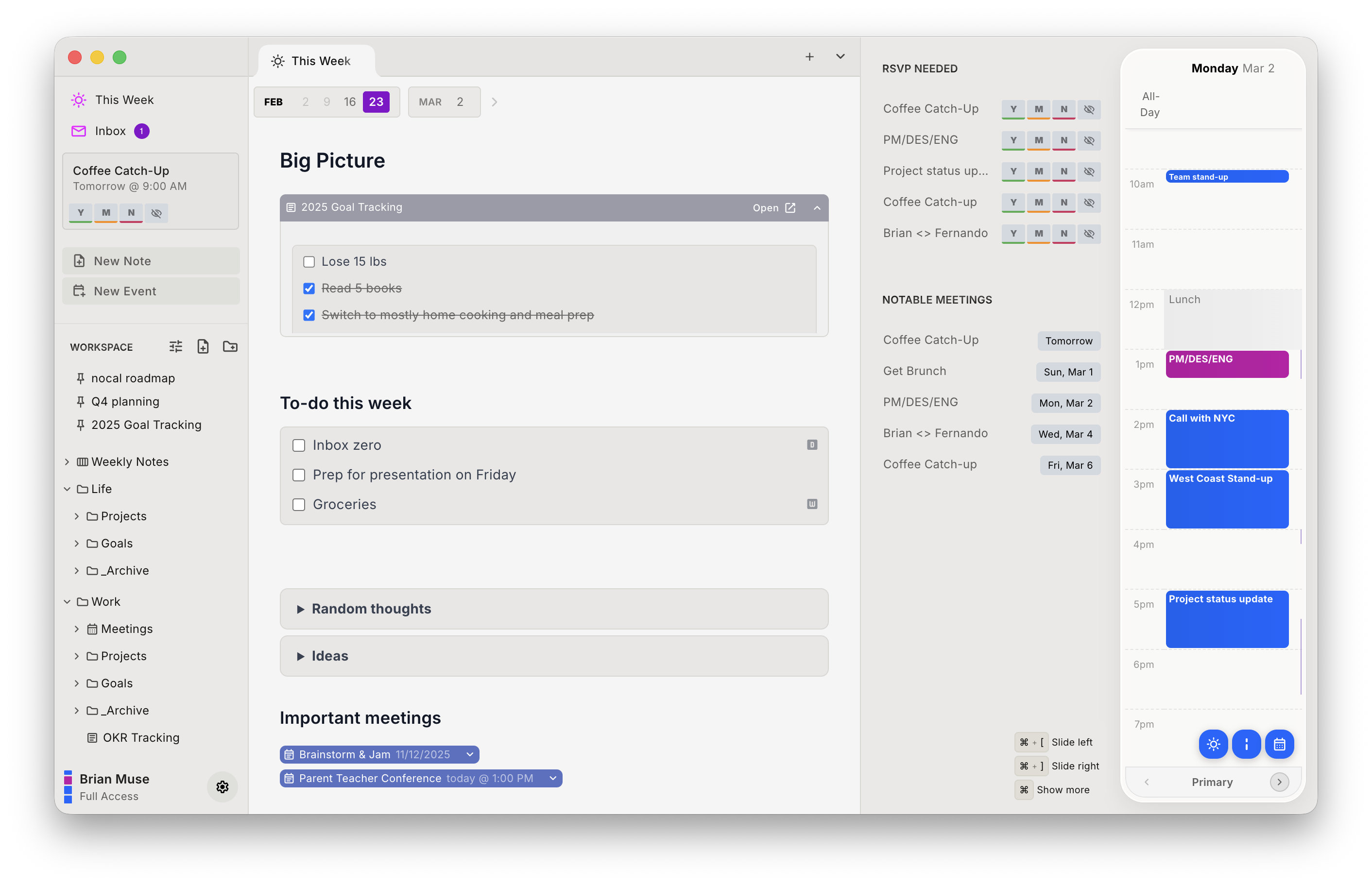
It also runs where Apple Calendar won't, on Windows and Android, so the same calendar-and-notes setup follows you off Apple hardware. It ships a built-in MCP server for your notes (Claude, ChatGPT, and Cursor can search, read, create, and conflict-safely update them), where Apple exposes none. And it scores incoming invites for spam and lets you delete a bad one without notifying the sender. The desktop tier is free, matching Apple Calendar on price for Google and Outlook accounts.
| Strengths | Weaknesses |
|---|---|
| Real markdown notes attached to events | Cannot connect iCloud, Apple Calendar's home turf |
| Runs on Windows and Android, not just Apple | No Apple Watch or Vision Pro app |
| Free desktop tier for Google and Outlook | No Apple Intelligence event detection or Siri |
| MCP server for notes, read and write | Mobile requires a paid tier; Apple Calendar is free |
| Search covers notes and events at once | Smaller ecosystem; no native Reminders/Notes bridge |
Pick nocal if your events are on Google or Microsoft and you want notes on the calendar across every platform. Skip it if any calendar is in iCloud; it can't read those at all.
Other options
The right list depends entirely on where your calendars live. If iCloud is in the mix, these are the ones that can actually connect to it.
Fantastical: best premium client for Apple users
Fantastical is the obvious upgrade if you want more than Apple Calendar but aren't leaving Apple. It connects iCloud, Google, Microsoft, and CalDAV, adds the best natural-language entry and scheduling tools in the category, and runs on Apple Watch and Vision Pro (plus Windows). It's $6.99/mo for Premium and has no notes app, but it's the most capable client that still speaks iCloud.
Morgen: best for iCloud plus cross-platform
If you need your iCloud calendar on Windows, Linux, or Android, Morgen is the one that does it. It connects iCloud, Google, Outlook/Microsoft 365, Fastmail, and CalDAV and runs everywhere, with AI time blocking and booking pages on top. It's $30/mo ($15/mo billed yearly) and stores no notes of its own.
Google Calendar: best if you're moving off iCloud
If you're rethinking iCloud anyway, Google Calendar is free, cross-platform, and has its own AI scheduling and MCP. Moving events off iCloud is real work, but once your calendars are on Google, nocal becomes available too, free, with the notes layer.
Switching from Apple Calendar to nocal
Only if your calendars are on Google or Microsoft. If so, there's nothing to migrate; both apps are clients on top of those accounts.
- Confirm your accounts. In Apple Calendar, check whether your calendars are under a Google or Exchange/Microsoft account rather than iCloud. If they're iCloud, stop here; nocal can't connect them.
- Install nocal on Mac or Windows and connect that Google or Microsoft account. The free desktop tier covers one account; merging several needs Full Access at $9.99/mo.
- Start with the weekly note, then attach notes to recurring meetings as they come up.
Your Apple Reminders and Apple Notes won't come across (nocal's notes are its own system), so treat this as a fresh start for the writing, not a migration of it.
FAQ
Can nocal connect to my iCloud calendar? No. nocal supports Google and Microsoft 365/Outlook only, so it cannot read iCloud or Apple calendars. If your events live in iCloud, Apple Calendar, Fantastical, or Morgen are the alternatives that can connect to them.
Is there a free alternative to Apple Calendar? Yes. nocal is free on Mac and Windows for Google and Outlook accounts and adds a notes app; Google Calendar is free too. Both skip iCloud, so they only help if your calendars are on Google or Microsoft.
Does Apple Calendar have note-taking? Not really. Notes live in Apple Notes and tasks in Apple Reminders, both separate apps. Scheduled reminders show in Calendar's day view, but you can't attach a written note to an event. nocal attaches a full markdown note to every meeting and keeps a weekly note, searchable alongside events.
Is there an Apple Calendar app for Windows or Android? Apple doesn't make one. iCloud calendars sync into Outlook via iCloud for Windows, and there's no Android app. nocal runs on Windows and Android (and Mac and iOS), but only for Google and Microsoft calendars, not iCloud.
Which Apple Calendar alternative works across all my devices? Morgen covers the most ground, iCloud included, on Mac, Windows, Linux, iOS, Android, and web. nocal runs on Mac, Windows, iOS, and Android but only for Google and Microsoft accounts.
Can an AI agent read my Apple Calendar? Not through an MCP server. Apple publishes none, and programmatic access is local via EventKit. Fantastical and Google Calendar offer calendar MCPs; nocal offers a notes MCP, for accounts on Google or Microsoft.
 Download for Mac
 Download for Windows
 Google Play Store