Fantastical Alternatives: 5 Options Compared for 2026
Fantastical has a free tier, but its scheduling is $6.99/mo, it keeps no notes, and there's no Android app. Five 2026 alternatives: pricing, providers, platforms, and when Fantastical still wins.
Updated August 14, 2026
Fantastical has the best natural-language entry and scheduling tools in the category. There's a free tier, but the scheduling suite is $6.99/mo, it keeps no notes of its own, and there's no Android app. If you're on Google or Microsoft and want writing attached to your calendar for free, nocal is the closest fit. If your calendars are in iCloud or you live in the Apple ecosystem, stay put.
Your calendars are in iCloud, Exchange, or CalDAV; nocal connects only Google and Microsoft 365. You want Fantastical's Openings and Proposals scheduling, its natural-language entry, or an AI agent that creates and reschedules calendar events, which Fantastical's MCP connector does and nocal's does not. Or you're on Apple Watch or Vision Pro, where Fantastical runs and nocal doesn't.
Fantastical is the most polished calendar client on Apple hardware, and the people looking for an alternative usually aren't complaining about how it works. They've hit one of three walls: the $6.99/mo subscription, the lack of any notes app of its own, or the missing Android version.
It's a good product, and for a lot of people the right answer is to stay.
At a glance
 Fantastical$6.99/mo Premium ($4.75/mo billed annually); free tier; 14-day trialGoogle, iCloud, Microsoft 365/Exchange, CalDAV, TodoistMac, Windows, iPhone, iPad, Watch, Vision Pro. No AndroidTask management; syncs Reminders/Todoist. No notes appCalendar MCP (Fantastical Connector) for Claude on Mac
 nocalFree on desktop; $4.99/mo mobile; $9.99/mo fullGoogle, Microsoft 365/Outlook. No iCloudMac, Windows, iOS, AndroidFull markdown notes; tasks live in notesNotes: search, read, create, update
 Morgen$30/mo, or $15/mo billed yearlyGoogle, Outlook/M365, iCloud, Fastmail, CalDAVMac, Windows, Linux, iOS, Android, webNo notes; integrates 8 task toolsNone; REST API only
 Google CalendarFreeGoogleWeb, Android, iOS. No native desktop appGoogle Tasks; notes in KeepFirst-party calendar MCP; Gemini scheduling (paid)
 Apple CalendarFreeiCloud, Google, Exchange, CalDAVMac, iPhone, iPad, Watch, Vision Pro, web. No Windows/AndroidReminders and Notes are separate appsNoneFantastical
- Price
- $6.99/mo Premium ($4.75/mo billed annually); free tier; 14-day trial
- Calendar accounts
- Google, iCloud, Microsoft 365/Exchange, CalDAV, Todoist
- Platforms
- Mac, Windows, iPhone, iPad, Watch, Vision Pro. No Android
- Notes and tasks
- Task management; syncs Reminders/Todoist. No notes app
- MCP server
- Calendar MCP (Fantastical Connector) for Claude on Mac
nocal- Price
- Free on desktop; $4.99/mo mobile; $9.99/mo full
- Calendar accounts
- Google, Microsoft 365/Outlook. No iCloud
- Platforms
- Mac, Windows, iOS, Android
- Notes and tasks
- Full markdown notes; tasks live in notes
- MCP server
- Notes: search, read, create, update
Morgen- Price
- $30/mo, or $15/mo billed yearly
- Calendar accounts
- Google, Outlook/M365, iCloud, Fastmail, CalDAV
- Platforms
- Mac, Windows, Linux, iOS, Android, web
- Notes and tasks
- No notes; integrates 8 task tools
- MCP server
- None; REST API only
Google Calendar- Price
- Free
- Calendar accounts
- Platforms
- Web, Android, iOS. No native desktop app
- Notes and tasks
- Google Tasks; notes in Keep
- MCP server
- First-party calendar MCP; Gemini scheduling (paid)
Apple Calendar- Price
- Free
- Calendar accounts
- iCloud, Google, Exchange, CalDAV
- Platforms
- Mac, iPhone, iPad, Watch, Vision Pro, web. No Windows/Android
- Notes and tasks
- Reminders and Notes are separate apps
- MCP server
- None
Checked 14 August 2026 against each vendor's own pages: Fantastical and its pricing, Morgen, Google Workspace, and Apple Calendar.
What Fantastical is
A premium, Apple-first calendar and scheduling app that also runs on Windows. It connects to Google, iCloud, Microsoft 365/Exchange, CalDAV, and Todoist, and it's built around a few things it does better than anyone: natural-language entry ("dinner with Alex Friday 7pm" becomes an event), a scheduling suite with Openings (share your availability) and Proposals (suggest several times), Calendar Sets, and Focus Filters. In March 2026 it added the Fantastical Connector, an MCP server that lets the Claude desktop app on Mac read your calendar and create, reschedule, or delete events.
It manages tasks: natural-language reminders that sync with iCloud Reminders, Todoist, and Google Tasks. But it has no notes app. You can attach a file or a short note to an event; you can't write and organize documents in it.
The free tier gives you the calendar with limits. Premium is $6.99/mo, or $4.75/mo billed annually (a Family plan covering up to five people is $7.50/mo billed annually). The scheduling tools and the good stuff sit behind that subscription.
Why choose nocal
Two things: it's cheaper, and it's built for writing. Fantastical's task-and-reminder model schedules your commitments. nocal gives each one a place to write.
Every meeting can carry a full markdown note. Every week gets one weekly note that carries forward. Notes hold checklists, tables, and @-mentions that link another note or an event inline, sit in folders and spaces with templates like PARA, and a single search covers your notes and your events together. And the desktop tier is free, while Fantastical's real capability starts at $6.99/mo.
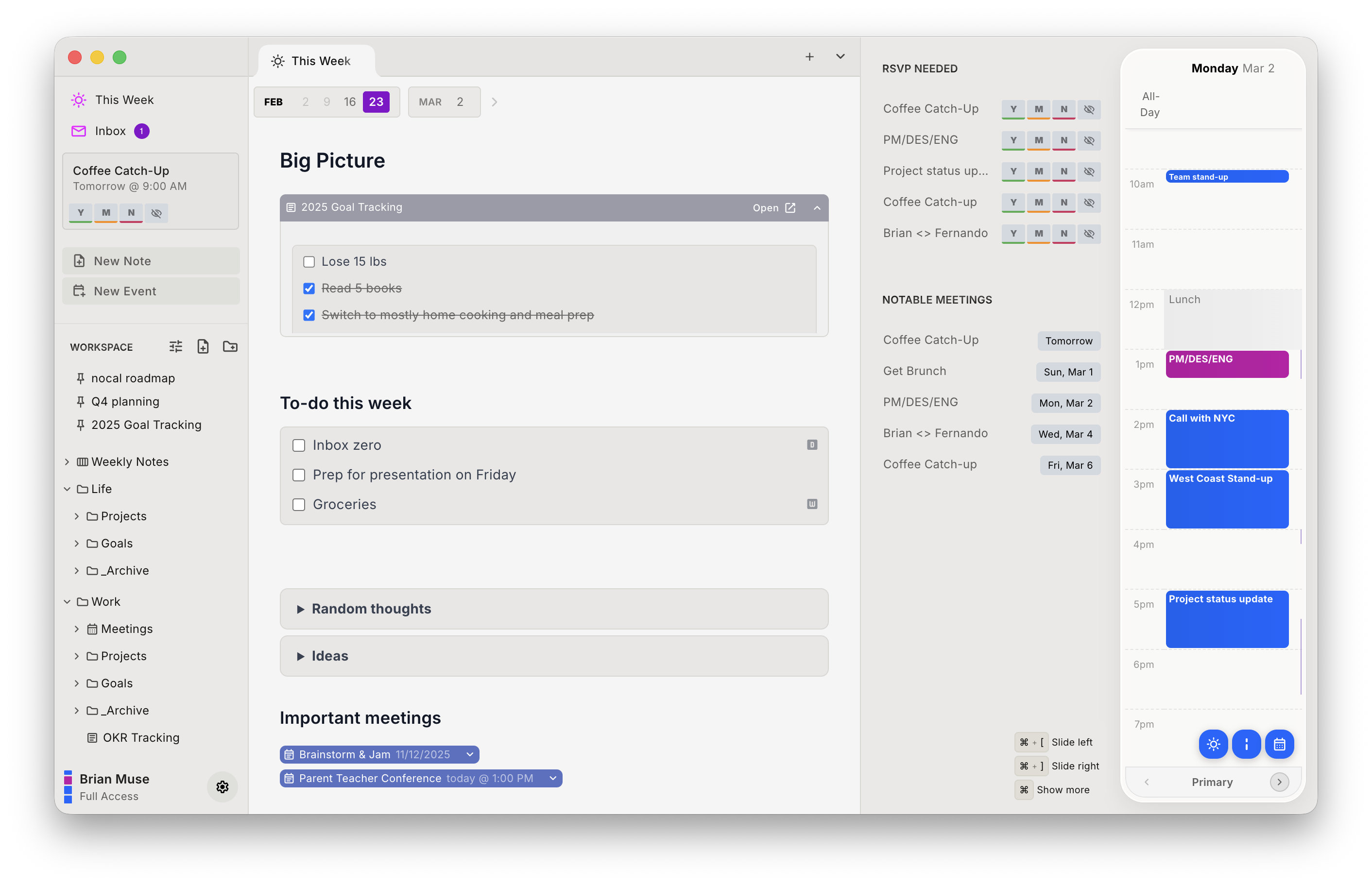
nocal ships a built-in MCP server too, aimed at a different half of the workflow. Fantastical's connector lets Claude manage your calendar; nocal's covers your notes, so Claude, ChatGPT, and Cursor can search, read, create, and conflict-safely update them. If you want an agent writing events, Fantastical is ahead; if you want one writing notes, that's nocal. nocal also scores incoming invites for spam and lets you delete a bad one without notifying the sender, and it runs on Android, which Fantastical doesn't.
| Strengths | Weaknesses |
|---|---|
| Free desktop tier vs Fantastical's $6.99/mo | No iCloud, Exchange, or CalDAV; Fantastical has all three |
| Real markdown notes attached to events | Weaker natural-language entry and scheduling than Fantastical |
| Runs on Android | No Apple Watch or Vision Pro app |
| MCP server for notes, read and write | MCP covers notes, not the calendar (Fantastical's does events) |
| Search covers notes and events at once | No Focus Filters / Calendar Sets equivalent |
Pick nocal if you're on Google or Microsoft, you want notes on your calendar, and free matters. Skip it if your calendars are on iCloud, or Fantastical's scheduling and entry are the reason you're there.
Other options
If neither the notes nor the scheduling angle is the point, here are the rest.
Morgen: best for calendar coverage and scheduling
If you like Fantastical's scheduling but need broader provider support, Morgen connects to more calendar systems than anything here (Google, Outlook/Microsoft 365, iCloud, Fastmail, and CalDAV), adds AI time blocking and booking pages, and is the only option with a Linux app. It's the priciest at $30/mo ($15/mo billed yearly) and stores no notes of its own.
Apple Calendar: best if free and native is enough
If Fantastical's polish is nice-to-have but the subscription isn't worth it, Apple Calendar is free, native across every Apple device, and connects to the same iCloud, Google, and Exchange accounts. You lose the natural-language entry and scheduling tools, and notes and reminders stay in their own apps, though Apple Intelligence now detects event details in Mail and Messages.
Google Calendar: best if you're already on Google
If your calendars are all Google and you don't need iCloud, Google Calendar is free, has its own AI scheduling and a first-party calendar MCP, and drops the subscription entirely. No desktop app and no notes, but for a Google-only setup it covers the basics at no cost.
Switching from Fantastical to nocal
If your calendars are on Google or Microsoft, there's nothing to migrate; both apps are just clients on top of those accounts.
- Install nocal on Mac or Windows and connect your Google or Microsoft account. The free desktop tier covers one account; merging several needs Full Access at $9.99/mo.
- Start with the weekly note. It's the habit that makes the rest make sense.
- Attach notes to your recurring meetings as they come up rather than migrating everything at once.
The hard constraint: nocal cannot connect iCloud, Exchange, or CalDAV accounts. If any of your Fantastical calendars are Apple-hosted or on Exchange, nocal won't see them, and this isn't the switch to make. Only Google and Microsoft 365/Outlook come across.
FAQ
Is there a free alternative to Fantastical? Yes. nocal is free on Mac and Windows with full Google and Outlook management and unlimited notes, and it adds a markdown note to every meeting. Apple Calendar and Google Calendar are free too, without the notes. Fantastical has a free tier, but its scheduling tools sit behind the $6.99/mo Premium plan.
Does Fantastical have a notes app? No. Fantastical manages tasks and reminders (syncing iCloud Reminders, Todoist, and Google Tasks) and lets you attach files to events, but it has no notes app of its own. nocal makes notes the primary object: markdown, folders, a weekly note, and a note per meeting, all searchable with your events.
Does Fantastical work on Android? No. Fantastical runs on Mac, Windows, iPhone, iPad, Apple Watch, and Vision Pro, but there's no Android app. nocal runs on Mac, Windows, iOS, and Android.
Which Fantastical alternative supports iCloud? Morgen and Apple Calendar both connect iCloud directly. nocal does not; it's Google and Microsoft 365/Outlook only, so if your calendars are Apple-hosted, it isn't the alternative for you.
Can an AI agent manage my calendar like Fantastical's MCP? Fantastical's Connector lets Claude on Mac create and reschedule events; Google Calendar has a first-party MCP that does the same. nocal's MCP is pointed at notes instead (search, read, create, and update), so it's the choice when you want an agent writing notes rather than events.
What's the best Fantastical alternative with built-in notes? nocal, if your calendars are on Google or Microsoft. It's the only option here that pairs a full markdown notes app with the calendar, and its desktop tier is free.
 Download for Mac
 Download for Windows
 Google Play Store