Morgen Alternatives: 5 Options Compared for 2026
Morgen costs $30/mo and has no notes of its own. Five alternatives for 2026: pricing, calendar providers, platforms, and when Morgen still wins.
Updated August 4, 2026
Morgen's paid tier is $30/mo, or $15/mo billed yearly. If that is the problem, nocal is free on Mac and Windows for Google and Outlook calendars, and it gives you a full notes app on top. If you need iCloud, CalDAV, or Linux, nothing here matches Morgen and you should stay.
You have calendars in iCloud, Fastmail, or generic CalDAV, you run Linux, or your tasks live in Todoist, Notion, or Linear and you need them scheduled onto the calendar. Morgen's provider and integration coverage is the broadest in this category and nothing here replaces it.
Morgen is the most technically complete scheduler in this category. It connects to more calendar systems than anything else, it is the only serious option with a Linux desktop app, and its task integrations reach into eight other tools. People who leave it rarely leave because it lacked something.
They leave over the price, or because they wanted somewhere to write and Morgen is not that.
At a glance
 Morgen$30/mo, or $15/mo billed yearly; 14-day trialGoogle, Outlook/M365, iCloud, Fastmail, CalDAVMac, Windows, Linux, iOS, Android, webNoneNone; REST API only
 nocalFree on desktop; $4.99/mo mobile; $9.99/mo fullGoogle, Microsoft 365/OutlookMac, Windows, iOS, AndroidFull markdown notes appNotes: search, read, create, update
 Notion CalendarFreeGoogle, Outlook, Apple/iCloudMac, Windows, iOS, AndroidNone built inNotion pages only, no calendar
 Amie$25/mo, or $20 billed yearly. Only paid plans listedGoogle accounts; Outlook only via its Apple Calendar integrationMac, Windows, iPhone. No AndroidAI meeting recording and transcriptsCalendar, todos, contacts, notes
 Google CalendarFreeGoogleEverywhereNoneNoneMorgen
- Price
- $30/mo, or $15/mo billed yearly; 14-day trial
- Calendar accounts
- Google, Outlook/M365, iCloud, Fastmail, CalDAV
- Platforms
- Mac, Windows, Linux, iOS, Android, web
- Notes
- None
- MCP server
- None; REST API only
nocal- Price
- Free on desktop; $4.99/mo mobile; $9.99/mo full
- Calendar accounts
- Google, Microsoft 365/Outlook
- Platforms
- Mac, Windows, iOS, Android
- Notes
- Full markdown notes app
- MCP server
- Notes: search, read, create, update
Notion Calendar- Price
- Free
- Calendar accounts
- Google, Outlook, Apple/iCloud
- Platforms
- Mac, Windows, iOS, Android
- Notes
- None built in
- MCP server
- Notion pages only, no calendar
Amie- Price
- $25/mo, or $20 billed yearly. Only paid plans listed
- Calendar accounts
- Google accounts; Outlook only via its Apple Calendar integration
- Platforms
- Mac, Windows, iPhone. No Android
- Notes
- AI meeting recording and transcripts
- MCP server
- Calendar, todos, contacts, notes
Google Calendar- Price
- Free
- Calendar accounts
- Platforms
- Everywhere
- Notes
- None
- MCP server
- None
Checked 3 August 2026 against each vendor's own pages: Morgen, Notion Calendar, Amie pricing and FAQ, Amie downloads.
Give Morgen its due first
Before the alternatives, here's what you give up by leaving:
- Provider coverage. Google, Outlook/Microsoft 365, iCloud, Fastmail, and generic CalDAV. Nothing else on this page comes close.
- Linux. Morgen ships a Linux desktop app. Among serious calendar clients that's nearly a category of one.
- Task integrations. Notion, Todoist, Linear, ClickUp, Obsidian, Google Tasks, Microsoft To-Do, and Zoho, all schedulable onto the calendar.
- Planner and smart frames. AI time blocking that fills reserved periods with tasks matching your criteria.
- Booking pages are included rather than a separate subscription.
- Swiss-hosted and GDPR compliant, which for some buyers settles the question on its own.
If two or more of those are load-bearing for you, stop reading. Morgen is your tool.
Why choose nocal
The clearest difference is what happens when the meeting is over. Morgen schedules it. nocal gives it a note.
nocal attaches a full markdown note to any event, gives every week a single weekly note that carries forward, and groups related meetings and notes into spaces with methodology templates like PARA. Notes link to each other, contain live checklists, and one search covers notes and events together.
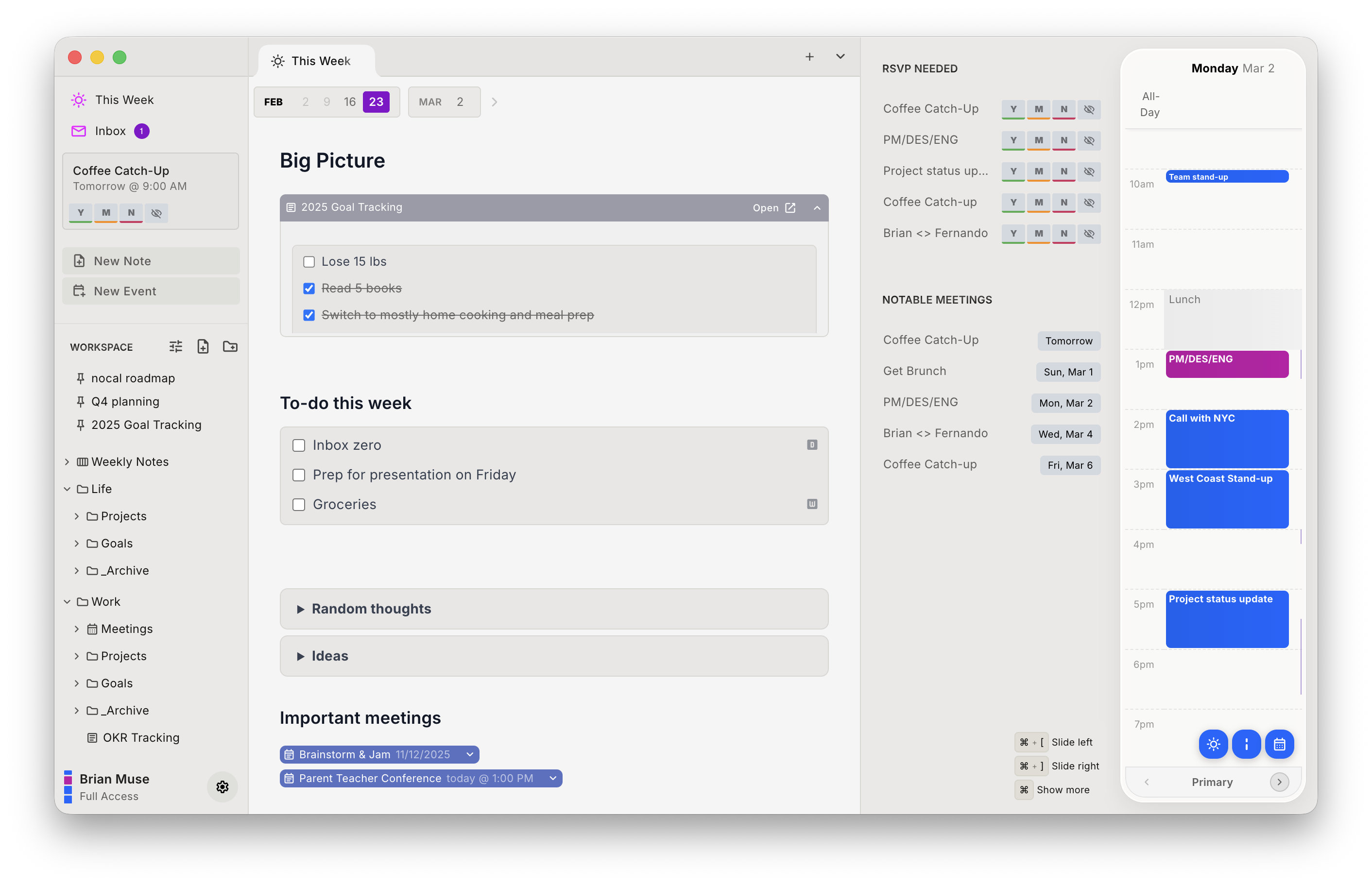
It also ships a built-in MCP server, so Claude, ChatGPT, and Cursor can search, read, create, and update your notes, with conflict-safe writes. It covers notes rather than calendar events. Morgen ships no first-party equivalent, though third-party servers are built on its public REST API. nocal also scores incoming invites for spam, letting you delete a bad one without notifying the sender.
On price it is not close: nocal is free on Mac and Windows, permanently, with full Google and Outlook management and unlimited notes. Mobile is $4.99/mo, full access $9.99/mo.
| Strengths | Weaknesses |
|---|---|
| Free desktop tier, no trial clock | Google and Microsoft only, no iCloud, Fastmail, or CalDAV |
| Real notes app attached to the calendar | No Linux |
| MCP server for AI agents | No third-party task integrations (tasks live in your notes) |
| Calendar Ideas proposes declines and focus blocks | No booking pages |
| Invite spam detection with silent delete | Mobile behind a paid tier |
Pick nocal if you're on Google or Microsoft and the problem is that meeting context keeps getting lost.
Other options
If nocal is not the fit, these are the other places Morgen users land. Be clear-eyed that none of them match Morgen's provider coverage.
Notion Calendar: best free option if you live in Notion
Free, well built, and it connects to Google, Outlook, and Apple iCloud, so it covers the iCloud case that nocal does not. Notion database items appear beside your events, and you can drag them to reschedule.
The limits are real: no note-taking or tasks of its own, and Notion's FAQ confirms the integration runs one way. Google Calendar events cannot be pulled into Notion databases. Outside Notion it's a good free calendar and little more.
Notion Calendar is the move if your work already lives in Notion and you want to stop paying for scheduling.
Amie: best meeting capture, narrowest calendar support
Amie now positions itself as an AI note taker rather than a calendar, leading with bot-free meeting recording, transcripts, and summaries. It's good at that, and it's the prettiest interface in the category.
Coming from Morgen, the calendar side will feel like a sharp downgrade. Amie's own FAQ says it supports Google calendar accounts, with Outlook reachable only "through our Apple Calendar integration." No native Microsoft 365, no CalDAV, no Fastmail. There is no Android app and no Linux. And only paid plans are listed: $25/mo, or $20 billed yearly, after a 7-day trial.
Amie makes sense if capturing meetings is the job and your calendars are all on Google.
Sunsama: best for the planning ritual
Sunsama deliberately refuses to auto-schedule. It runs you through a guided daily planning session and asks you to commit to a realistic day. Where Morgen's Planner automates the decision, Sunsama makes you make it.
It is priced at the premium end, so it does not solve a cost problem.
Pick Sunsama if you overcommit and want friction, not automation.
Google Calendar: best if you want to stop paying
Free, everywhere, and the source of truth the paid clients are syncing from. You lose the unified multi-account view, time blocking, and everything else. If you were mainly paying for polish, this is the floor of the category. See the Google Calendar comparison.
Switching from Morgen to nocal
Your events do not move. Morgen and nocal are both clients on top of Google and Microsoft.
- Install nocal on Mac or Windows and connect your Google or Microsoft account. The free desktop tier covers one account; merging several needs Full Access at $9.99/mo.
- Recreate any calendar groups you relied on. This needs the $9.99/mo tier.
- Rebuild recurring focus blocks, or let Calendar Ideas propose them from your actual week.
- Keep Morgen until you are sure. Nothing is locked in either direction.
Two things do not come with you: iCloud, Fastmail, or CalDAV accounts cannot be connected at all, and tasks living in Todoist, Notion, or Linear have no integration. In nocal, tasks live inside notes.
FAQ
Is there a free alternative to Morgen? Yes. nocal is free on Mac and Windows with full Google and Outlook management and unlimited notes, and Notion Calendar and Google Calendar are both free. Morgen itself offers a 14-day full-access trial rather than a permanent free tier.
Which Morgen alternative supports iCloud or CalDAV? Notion Calendar and Amie both connect to Apple iCloud. For generic CalDAV or Fastmail, Morgen remains the only option here. nocal supports Google and Microsoft only.
Does any alternative to Morgen run on Linux? Not among these. Morgen's Linux desktop app is close to unique in this category, and it is the strongest single reason to stay.
How much does Morgen cost? $30/month billed monthly, or $15/month billed annually, for the individual Pro plan. Team plans are $25/seat/month monthly or $10/seat/month annually with a two-seat minimum, and there is a 14-day free trial.
Which alternative has the best notes? nocal. Notes are the primary object there rather than a field on an event, with markdown, folders, @-mention links to notes and events, spaces, and a search that covers notes and events at once. Amie has the best meeting notes specifically, because it records and transcribes.
Can AI agents read my calendar and notes? nocal ships a built-in MCP server so Claude, ChatGPT, and Cursor can search, read, create, and update notes, with conflict-safe writes. It covers notes, not calendar events. Morgen ships no first-party MCP server, though third-party ones are built on its public REST API.
 Download for Mac
 Download for Windows
 Google Play Store