Amie Alternatives: 5 Options Worth Switching To in 2026
Amie now prices around AI meeting notes, from $20/mo, with Google-only calendar accounts. Five alternatives for 2026, with prices and platforms.
Updated August 4, 2026
Most people searching for an Amie alternative in 2026 wanted the calendar-and-todo app Amie used to be, before it repositioned around AI meeting notes and stopped listing a free plan. If that's you and your calendars are on Google or Microsoft, nocal is the closest free replacement. If you need iCloud or CalDAV, use Morgen.
The bot-free AI meeting recorder is why you pay. It records, transcribes, and summarizes locally without sending a bot into the call, and nothing on this list replaces that. nocal does not record or transcribe meetings at all.
Amie built one of the best-looking calendars anyone has shipped. It just isn't selling that product anymore.
Amie's homepage today leads with "AI Note Taker without a bot" and names Fireflies, Otter, and Fathom as what it replaces. That is a deliberate and well-executed repositioning, and it is also why you are probably here: the calendar-and-todo app is still in there, but it is not what Amie is priced or marketed as anymore.
This page is for people who wanted that app. It compares five alternatives on what decides the switch: price, which calendar accounts connect, which platforms you get, and whether notes are a real feature.
At a glance
 Amie$25/user/mo, or $20 billed yearly. 7-day trial. Paid plans are all the pricing page listsGoogle accounts; Outlook only via the Apple Calendar integrationMac, Windows, iPhone. No AndroidAI meeting recording, transcripts, summariesCalendar, todos, contacts, notes
 nocalFree on desktop; $4.99/mo mobile; $9.99/mo fullGoogle, Microsoft 365/OutlookMac, Windows, iOS, AndroidFull markdown notes app: weekly note, note per meeting, folders, @-mention linksNotes: search, read, create, update
 Morgen$30/mo, or $15/mo billed yearly; 14-day trialGoogle, Outlook/M365, iCloud, Fastmail, CalDAVMac, Windows, Linux, iOS, Android, webNone; deep task integrations insteadNone; REST API only
 Notion CalendarFreeGoogle, Outlook, Apple/iCloudMac, Windows, iOS, AndroidNone built in. Surfaces Notion itemsNotion pages only, no calendar
 Google CalendarFreeGoogleEverywhereNoneNoneAmie
- Price
- $25/user/mo, or $20 billed yearly. 7-day trial. Paid plans are all the pricing page lists
- Calendar accounts
- Google accounts; Outlook only via the Apple Calendar integration
- Platforms
- Mac, Windows, iPhone. No Android
- Notes
- AI meeting recording, transcripts, summaries
- MCP server
- Calendar, todos, contacts, notes
nocal- Price
- Free on desktop; $4.99/mo mobile; $9.99/mo full
- Calendar accounts
- Google, Microsoft 365/Outlook
- Platforms
- Mac, Windows, iOS, Android
- Notes
- Full markdown notes app: weekly note, note per meeting, folders, @-mention links
- MCP server
- Notes: search, read, create, update
Morgen- Price
- $30/mo, or $15/mo billed yearly; 14-day trial
- Calendar accounts
- Google, Outlook/M365, iCloud, Fastmail, CalDAV
- Platforms
- Mac, Windows, Linux, iOS, Android, web
- Notes
- None; deep task integrations instead
- MCP server
- None; REST API only
Notion Calendar- Price
- Free
- Calendar accounts
- Google, Outlook, Apple/iCloud
- Platforms
- Mac, Windows, iOS, Android
- Notes
- None built in. Surfaces Notion items
- MCP server
- Notion pages only, no calendar
Google Calendar- Price
- Free
- Calendar accounts
- Platforms
- Everywhere
- Notes
- None
- MCP server
- None
Checked 3 August 2026 against each vendor's own pages: Amie pricing and FAQ, Amie downloads, Morgen pricing, Notion Calendar.
Why people look for an Amie alternative
Three reasons, all documented on Amie's own site rather than inferred from reviews.
The plan you were on is gone. Amie ran a free "Basic" tier until September 2024 and briefly offered a calendar-and-todos "Personal" plan in early 2025 at $6/mo billed yearly, $10 monthly. Neither is on the pricing page now, which lists only Pro and Business. The cheapest listed way in is the $20/mo AI-notes plan, after a 7-day trial. Amie's own comparison pages still describe a free tier covering calendar and todos, so something free may exist without being advertised, but the product you were paying for is priced differently now and attached to a different product.
Calendar account support is narrower than most people expect. Amie's own FAQ states it supports Google calendar accounts on macOS, Windows, and iPhone, and that "Outlook can be connected through our Apple Calendar integration." There is no native Microsoft 365 connection, and no CalDAV or Exchange. If your work calendar is Outlook, you are routing it through a Mac-only relay.
No Android. Amie's download page lists macOS, iOS, and Windows. There is no Android app. For a lot of people that alone ends the evaluation.
For fairness, Amie's reputation is not uniformly bad, and it would be dishonest to imply otherwise. It holds 4.8/5 on Product Hunt and reviews well on Setapp. Its App Store rating is harsher, at 3.39/5 across 128 ratings, and the negative reviews cluster after the repositioning, which is consistent with the pattern above rather than a verdict on the current product.
Why choose nocal
nocal is close to what a lot of people were using Amie for, built from the other direction. Amie is a calendar that grew notes. nocal is a notebook that knows your schedule.
Every week gets one weekly note, auto-titled and carried forward. Every meeting can carry its own note. Those notes are full markdown with checklists, tables, folders, and @-mentions that link another note or a calendar event inline, grouped into spaces with templates like PARA. One search covers notes and events together, so "what did we decide about pricing" finds the meeting and the note.
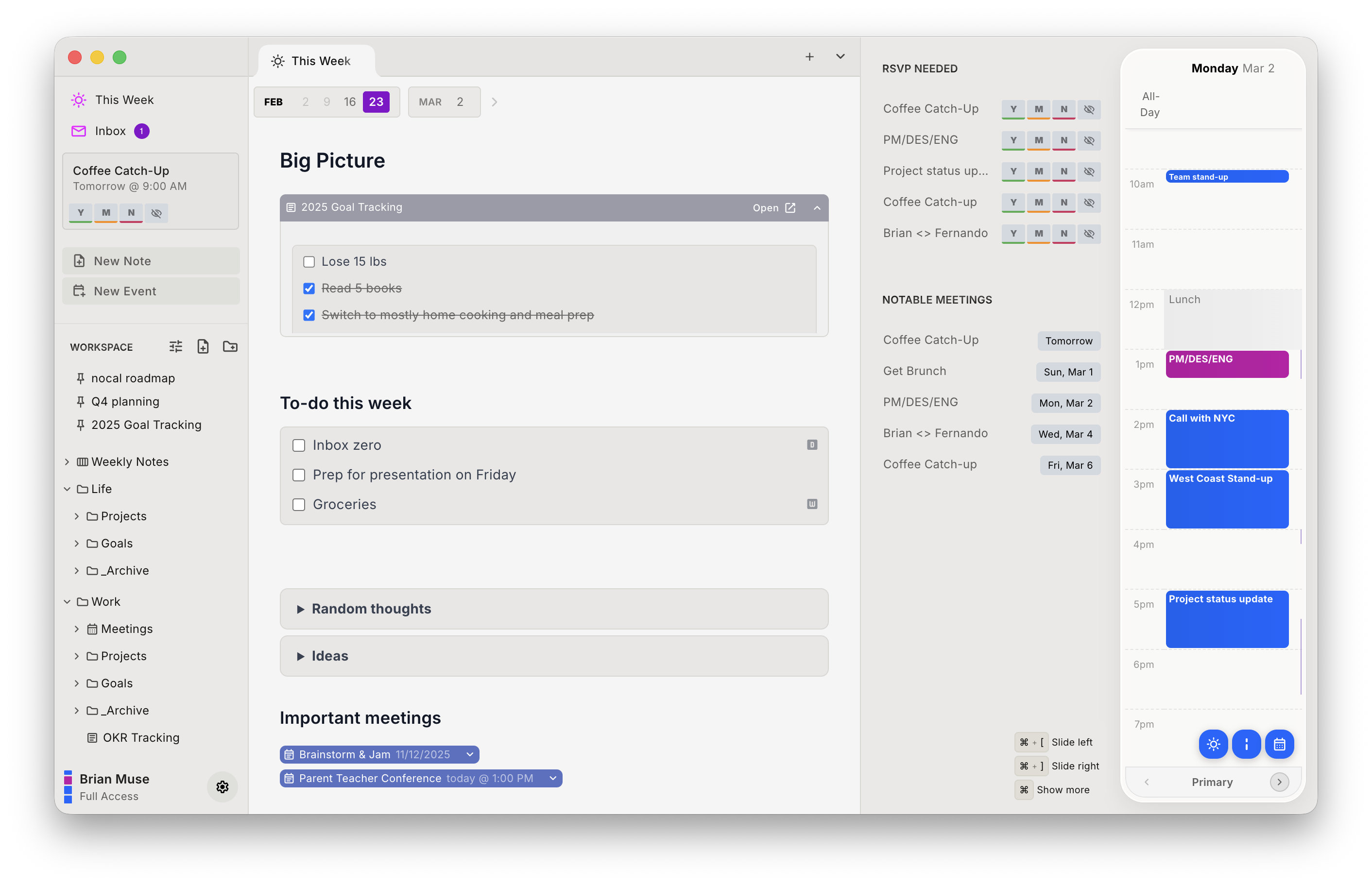
It also ships a built-in MCP server, so Claude, ChatGPT, and Cursor can search, read, create, and conflict-safely update your real notes instead of losing the work in a chat window. Amie added one in July 2026 that reaches its calendar, todos, and contacts as well, so this is a difference of shape rather than presence. And it treats the calendar as an inbox that can be attacked: invites are scored for spam, and deleting a flagged one blocks the sender without sending them a decline notification.
The price difference is the blunt part. nocal is free on Mac and Windows with full Google and Outlook management and unlimited notes: not a trial, no card required. Mobile is $4.99/mo. $9.99/mo unlocks unlimited calendar connections, calendar groups, and widgets. Students are free with a .edu address.
| Strengths | Weaknesses |
|---|---|
| Free desktop tier, no trial clock | No Apple or iCloud calendar support at all |
| Native Microsoft 365/Outlook, not a relay | No meeting recording or transcription |
| Notes are a real notes app, not event fields | No Linux |
| Android app, which Amie has never shipped | Mobile is behind a paid tier |
| MCP server for AI agents, read and write | Younger product than Google Calendar or Fantastical |
| Spam detection and silent delete on invites | No booking pages |
Pick nocal if you are on Google or Microsoft, you write a lot, and you want the AI part working on your notes rather than recording your voice. Skip it if you are on iCloud. The accounts simply can't be connected.
Other options
If nocal isn't the fit, here are the other apps worth a look, including two that reach calendar accounts nocal cannot.
Morgen: best for broad calendar support and time blocking
Morgen connects to more calendar systems than anything else here: Google, Outlook/Microsoft 365, iCloud, Fastmail, and generic CalDAV. It is also the only option with a real Linux desktop app.
Its Planner does AI time blocking against your actual availability. Task integrations are the deepest in the category too: Notion, Todoist, Linear, ClickUp, Obsidian, Google Tasks, Microsoft To-Do, and Zoho all feed onto the calendar. Booking pages are included.
At $30/mo billed monthly it costs more than Amie. At $15/mo billed yearly, it costs less. There is a 14-day full-access trial, and it is Swiss-hosted and GDPR compliant.
What it does not have is notes at all. If Amie's meeting notes were the point, Morgen is a step backwards on that exact axis.
Pick Morgen if your calendars are scattered across iCloud or CalDAV, you run Linux, or your tasks already live in Todoist or Notion.
Notion Calendar: best free option, and it covers iCloud
Free, polished, and connects to Google, Outlook, and Apple iCloud, so it covers the Apple case nocal doesn't. If your team already runs on Notion, database items appear beside your events and you can drag to reschedule without leaving the calendar.
It has no note-taking or tasks of its own, and Notion's FAQ confirms the integration runs one way: Google Calendar events can't be pulled into Notion databases. Outside the Notion ecosystem it's a good free calendar and not much else.
If you're already a Notion shop, or you need iCloud support and want to pay nothing, Notion Calendar is the one.
Sunsama: best for a deliberate daily planning ritual
Sunsama refuses to auto-schedule. It walks you through a guided daily planning session, pulls tasks in from your other tools, and asks you to commit to a realistic day. People find it either transformative or a chore, with little middle ground.
It sits at the premium end of the category, so it does not solve a cost problem. Sunsama's for people whose problem is overcommitting, not scheduling.
Google Calendar: best if you want to stop paying entirely
Many people who churn off a premium calendar are fine on Google Calendar. It's free, works everywhere, ties into Gmail and Meet, and is the source of truth the paid apps sync from anyway.
You lose the unified multi-account view, the notes, and the polish. If those were not why you paid, you may not miss them.
Switching from Amie to nocal
Nothing needs migrating, which surprises people. Amie is a client on top of your Google calendar, not where your events live. Connect Google or Microsoft to nocal and your events are already there.
- Install nocal on Mac or Windows and sign in.
- Connect the Google or Microsoft account you want. If your Outlook calendar was reaching Amie through the Apple Calendar relay, connect it to nocal directly instead. The free desktop tier covers one account; merging several needs Full Access at $9.99/mo.
- Check your week. Every event should be present, colour-coded by source.
- Keep Amie installed until you are confident. There is no lock-in either direction.
Your Amie meeting notes, recordings, and transcripts do not transfer, and nocal has no equivalent feature. Export anything you need before you cancel.
FAQ
Does Amie still have a free plan? Amie's pricing page lists only paid plans: a 7-day trial, then $25/user/month or $20 billed yearly. Its own comparison pages refer to a free tier covering calendar and todos, so check at signup before assuming either way. The free "Basic" tier ran until September 2024 and the $6/mo (yearly) "Personal" plan until early 2025.
Is there a free alternative to Amie? Yes. nocal is free on Mac and Windows with full Google Calendar and Outlook management and unlimited notes. It's a permanent tier, not a trial. Notion Calendar and Google Calendar are also free.
Does Amie support Outlook? Not natively. Amie's own FAQ says it supports Google calendar accounts and that Outlook connects "through our Apple Calendar integration," which means routing it via a Mac. nocal and Morgen both connect to Microsoft 365 directly.
Is there an Amie app for Android? No. Amie's download page lists macOS, iOS, and Windows only. nocal, Morgen, and Notion Calendar all ship Android apps.
Does nocal work with iCloud calendars? No. nocal connects to Google Calendar and Microsoft 365/Outlook only. If your calendars are in iCloud, use Morgen or Notion Calendar.
Does any Amie alternative record and transcribe meetings? Not among these. Amie's bot-free recorder stands alone here, and if that's why you subscribe, none of these replaces it.
Can AI agents access my calendar and notes in these apps? Most of them, now. nocal's built-in MCP server covers notes: search, read, create, and update, with conflict-safe writes. It does not expose calendar events. Amie's, added in July 2026, reaches calendar events, todos, contacts, and meeting notes. Notion ships one for workspace pages with no calendar tools. Morgen and Google Calendar expose none.
 Download for Mac
 Download for Windows
 Google Play Store