Evernote Alternatives After the Price Hikes (2026)
Evernote's free plan is now 50 notes and one notebook, and unlimited costs $249.99 a year. Five alternatives for 2026, and an honest look at which Evernote habits move to nocal and which do not.
Updated August 23, 2026
Evernote's free plan dropped to 50 notes and one notebook, and getting unlimited notes back means the Advanced plan at $249.99 a year. If what you actually keep in Evernote is meeting notes, daily and weekly planning, and checklists next to your calendar, nocal covers that with a free desktop tier and unlimited notes. If you lean on Evernote for web clipping, PDFs, image attachments, and tags, nocal does not replace it, and this page says so plainly.
Evernote is a document and attachment vault, and nocal is not. nocal notes hold text, checklists, tables, and code, but no images, no PDFs, no file attachments, and no web clipper, and there are no tags. The desktop importer brings the text of your notes across, including from an Evernote export, but attachments, web clips, and tags stay behind. If your Evernote is years of clipped pages, scanned receipts, and tagged references, stay put.
If you are here, the price is probably why. Evernote's free plan is now capped at 50 notes and a single notebook, and the paid tiers have been renamed and repriced more than once under new ownership. Getting unlimited notes back means the Advanced plan at $249.99 a year. Plenty of long-time users are looking around for the first time in a decade.
Here is the honest shape of it. nocal is a calendar-first app that takes notes seriously, so if your Evernote is meeting notes, weekly planning, to-do lists, and the reference text you actually reread, you are the person it was built for. The free desktop tier gives you unlimited notes where Evernote now gives you fifty, and those notes live next to a calendar that Evernote never really had. If instead your Evernote is a vault of web clips, PDFs, scanned receipts, and tags, nocal will not replace it, and this page will point you somewhere better rather than pretend otherwise.
The change that sent you here
On 29 November 2023, Evernote announced that Free accounts would be held to fifty notes and one notebook, down from a free plan that for years let people keep as many notes as they liked. This is not our characterization. It is Evernote's own, from the announcement:
For Free users who have or who want more than fifty notes and one notebook, we recognize that these changes may lead you to reconsider your relationship with Evernote.
That is quoted directly from Evernote's post, which went live on 29 November 2023 and took effect on 4 December. The reaction was covered widely at the time, including by Engadget and Tom's Guide, the latter under the headline that its free-plan limits "have users looking for alternatives."
Then the price followed. Since the 2023 acquisition by Bending Spoons, Evernote has repriced more than once. In late 2025 it retired the Personal and Professional plans for two new tiers: Starter at $99 a year, and Advanced, the only standard plan with unlimited notes, at $249.99 a year. Long-time users have reported annual renewals climbing from around $99 to $249, and in one case from AU$159 to AU$309, sometimes noticed only after an auto-renewal. You can read the reaction in write-ups like this November 2025 breakdown and on Evernote's own user forum, where the recurring complaints are storage caps arriving for the first time, AI features bundled into the price, and notes that feel held hostage. If any of that is why you are here, these are the honest options.
At a glance
 Evernote50 notes, 1 notebook, 1 device, 200 attachmentsStarter $99/yr; Advanced $249.99/yr for unlimitedYes. Images, PDFs, files, Web Clipper, scanningGoogle Calendar link, notes attached to eventsMac, Windows, iOS, Android, Web
 nocalUnlimited notes on desktop, one spaceFree desktop; $4.99/mo mobile and sync; $9.99/mo fullNone. Text, checklists, tables, and code onlyGoogle and Microsoft 365, first-party, full managementMac, Windows, iOS, Android
 ObsidianFree, unlimited local notesSync from $4/mo; Publish from $8/moLocal files and embeds; no web clipperNone built in. Community plugins onlyMac, Windows, Linux, iOS, Android
 CraftFree, capped at 1,500 blocksPlus $10/mo, or $8/mo billed yearlyImages and files; best-looking docs hereApple Calendar only, on Apple devicesMac, iPhone, iPad only
 NotePlanNo free tier$12/mo, or $8.33/mo billed yearlyMarkdown links; light attachment supportGoogle, iCloud, Outlook on web; Apple Calendar on Mac and iOSMac, iPad, iPhone; web elsewhereEvernote
- Free tier
- 50 notes, 1 notebook, 1 device, 200 attachments
- Paid price
- Starter $99/yr; Advanced $249.99/yr for unlimited
- Attachments and clipping
- Yes. Images, PDFs, files, Web Clipper, scanning
- Built-in calendar
- Google Calendar link, notes attached to events
- Platforms
- Mac, Windows, iOS, Android, Web
nocal- Free tier
- Unlimited notes on desktop, one space
- Paid price
- Free desktop; $4.99/mo mobile and sync; $9.99/mo full
- Attachments and clipping
- None. Text, checklists, tables, and code only
- Built-in calendar
- Google and Microsoft 365, first-party, full management
- Platforms
- Mac, Windows, iOS, Android
Obsidian- Free tier
- Free, unlimited local notes
- Paid price
- Sync from $4/mo; Publish from $8/mo
- Attachments and clipping
- Local files and embeds; no web clipper
- Built-in calendar
- None built in. Community plugins only
- Platforms
- Mac, Windows, Linux, iOS, Android
Craft- Free tier
- Free, capped at 1,500 blocks
- Paid price
- Plus $10/mo, or $8/mo billed yearly
- Attachments and clipping
- Images and files; best-looking docs here
- Built-in calendar
- Apple Calendar only, on Apple devices
- Platforms
- Mac, iPhone, iPad only
NotePlan- Free tier
- No free tier
- Paid price
- $12/mo, or $8.33/mo billed yearly
- Attachments and clipping
- Markdown links; light attachment support
- Built-in calendar
- Google, iCloud, Outlook on web; Apple Calendar on Mac and iOS
- Platforms
- Mac, iPad, iPhone; web elsewhere
Free-plan limits checked in August 2026 against Evernote's own plan comparison. Evernote no longer prints prices on that page; the Starter and Advanced figures above are the current published rates as of August 2026 and are worth confirming at checkout for your region. Other apps checked against Obsidian pricing, Craft pricing, and NotePlan pricing.
Give Evernote its due first
Evernote invented the shape of this whole category, and at the thing it is actually for it is still very good. The Web Clipper is the best in the business. It holds images, PDFs, and file attachments inside a note, scans documents, does OCR so a photo of a receipt becomes searchable, and its tag system lets one note live in many contexts at once. It runs on every platform including the web, and after twenty years your notes are still there.
None of that is what nocal does. If you are leaving Evernote because the price went up but you still need the clipper, the attachments, and the tags, the honest move is a like-for-like notes app such as Notion or OneNote, not a calendar app. nocal is for a particular kind of Evernote user, the one whose notes travel with their calendar, and the next section makes that case.
Why choose nocal
nocal is a smaller idea than Evernote. It is a calendar app with real notes attached, rather than a filing cabinet that grew a calendar view.
Coming from Evernote, the parts that carry over are the ones you probably touched most days: the note you keep for each meeting, the running checklist, the weekly review, the reference note you reread. nocal is built around exactly those, and it puts them where the work happens, beside your schedule.
Your Google and Microsoft 365 accounts connect directly and nocal manages them in full, so the calendar is not a widget bolted onto a notes app, it is the point. Every meeting can carry a full note. Every week gets one weekly note that carries forward. Notes hold checklists, tables, and code blocks, and @-mentions link another note, an event, or a person inline. Notes sit in folders and spaces with room for a structure like PARA, and one search covers your notes and your events together. On the free desktop tier the notes are unlimited, which is the direct answer to a 50-note cap.
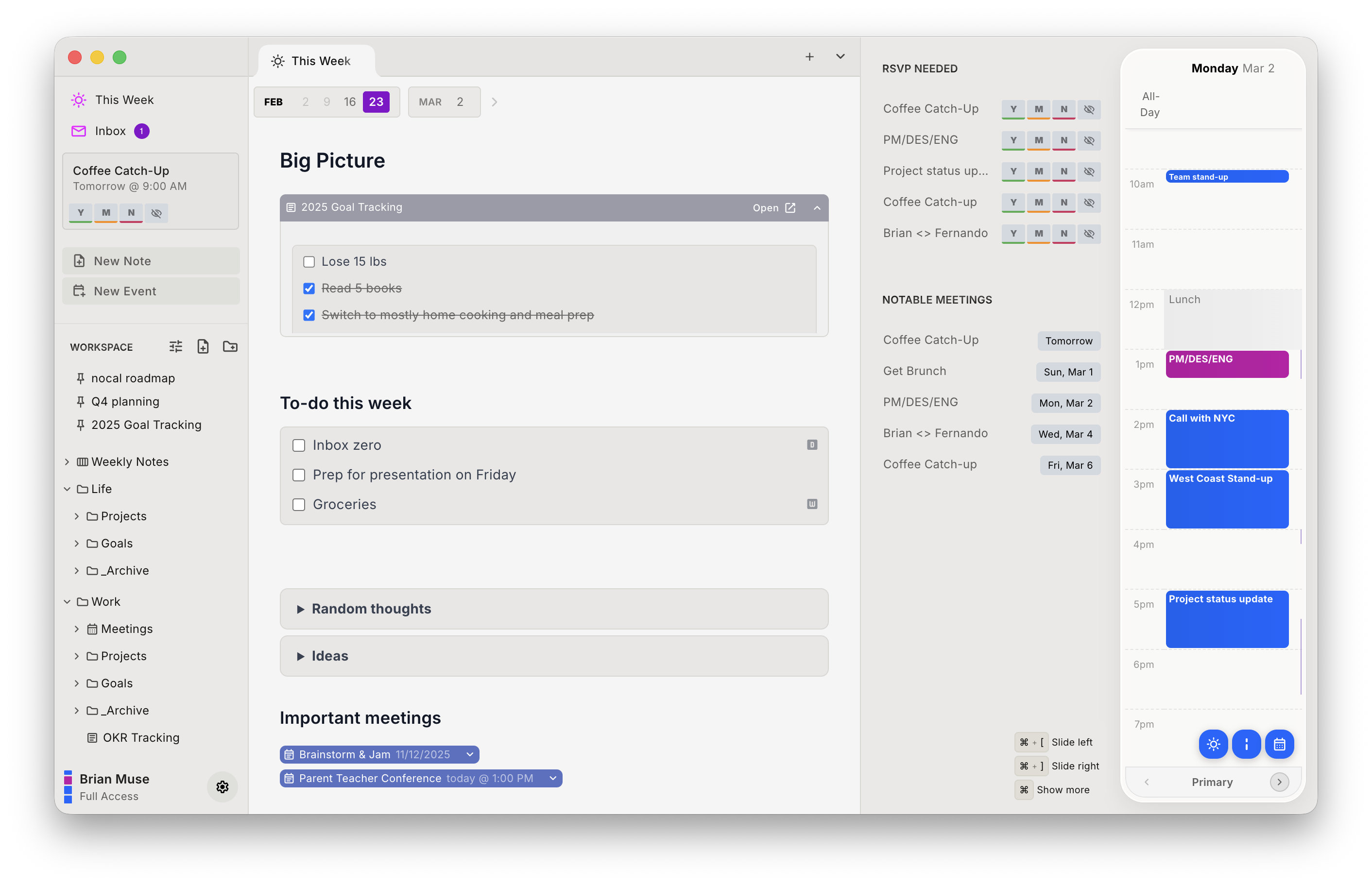
One more thing an Evernote power user tends to ask about: nocal ships a built-in MCP server, so Claude, ChatGPT, and Cursor can search, read, create, and safely update your notes, and read your calendar. It writes to your notes only, and never changes your events.
Here is the ledger, honestly, and it runs long on the right:
| Strengths | Weaknesses |
|---|---|
| Free desktop tier with unlimited notes | No images, PDFs, or file attachments in notes |
| Google and Microsoft 365 connect first-party | No web clipper and no document scanning |
| A note on every meeting, one search over notes and events | No tags. Organization is folders and spaces only |
| Imports your formatted Evernote notes, plus Markdown and text | No web app; Mac, Windows, iOS, and Android only |
| MCP server for agents, read and write | Mobile and cross-device sync are paid, from $4.99/mo |
Pick nocal if the notes you care about are meeting notes, weekly plans, and checklists, and you want them living next to a calendar that actually works. Skip it if Evernote is where you keep clipped articles, scanned paperwork, and tagged reference material, because nocal holds none of that.
Or run both. For a lot of people this is the right answer and it costs nothing on desktop: leave the archive in Evernote's free plan or an export, and use nocal for the calendar, the weekly note, and everything time-shaped from here on.
Other options
If nocal is not the fit, here are the ones worth a look, depending on which part of Evernote you are trying to keep.
Notion Calendar: best free calendar to sit beside a notes app
Free, native on Mac, Windows, iOS, and Android, and it connects to Google, Outlook, and Apple iCloud. It has no notes of its own, which here is the point: keep your notes wherever you land and let a good free calendar handle the schedule. The catch is that the two never really meet. See the Notion Calendar comparison.
Obsidian: best if you want to own your files
Free, unlimited, local plain-text files you control, on every platform including Linux, with 6,300 plus plugins. It is the strongest answer if what bothered you about Evernote was ownership as much as price. It ships no calendar, though, and the plugins that add one are uneven. The Obsidian comparison covers the calendar situation in detail.
Craft: best if you want the documents to look good
Craft is the prettiest place to write here, with a free tier capped at 1,500 blocks and Plus at $10/mo, or $8/mo billed yearly. It holds images and files, which nocal does not. Its calendar is Apple-only and second-hand, and the apps are Mac, iPhone, and iPad only. The Craft comparison has the rest.
NotePlan: best if you want notes, tasks, and calendar in one Apple app
Markdown notes, daily and weekly notes, tasks with real scheduling, and calendar events alongside. There is no free tier, at $12/mo or $8.33/mo billed yearly, and native apps are Apple only. If you are all-Apple and want one maintained product, read the NotePlan comparison.
Moving from Evernote to nocal
The nocal desktop app now imports an Evernote export, so the text of your notes moves across in one step. It is still worth being choosy: nocal is built for the notes that are about time and planning, not your whole clipped archive.
- Install nocal on Mac or Windows and connect your Google or Microsoft account. The free desktop tier covers one account and unlimited notes. Merging several accounts needs Full Access at $9.99/mo.
- In Evernote, export the notebooks you want as a single
.enexfile. Evernote does this from its own settings. - In nocal, choose Import and pick that
.enexfile, or drag it onto the notes sidebar. nocal reads it and adds each note to your list, with headings, lists, checklists, and tables intact. You can also import Markdown, plain text, and a.zipof Markdown files. See how to import notes. - Rebuild your daily-note or journal habit as nocal's weekly note. It is the nearest equivalent and it is where nocal expects the week to live.
What does not come with you: every image, PDF, and file attachment, anything saved with the Web Clipper, your tags, and your notebook structure. The importer leaves a short placeholder where an attachment was and reports what it dropped, so nothing disappears silently. A single note can hold up to 100,000 characters. If attachments and tags are most of your Evernote, this is your sign to stay, or to move to a full notes app instead.
FAQ
Why did Evernote get more expensive? Under its current owner, Bending Spoons, Evernote has renamed and repriced its plans more than once, and in its own November 2023 announcement it cut the free plan to 50 notes and one notebook. To get unlimited notes you now need the Advanced plan at $249.99 a year, up the ladder from the old free experience many people signed up for. Evernote's post acknowledged the change "may lead you to reconsider your relationship with Evernote," and for a lot of people it did.
Is nocal really free? The desktop app on Mac and Windows is free and includes unlimited notes and full Google and Outlook calendar management, with one space. The mobile apps and cross-device sync start at $4.99 a month, and unlimited calendar connections plus tray widgets are $9.99 a month. So the free tier is genuinely useful on a computer, but unlike Evernote's old free plan it does not include mobile.
Can I import my Evernote notes into nocal? Yes, on the desktop app. Export your notebooks from Evernote as an .enex file, then import that file into nocal, or drag it onto the notes sidebar. nocal also imports Markdown, plain text, and a .zip of Markdown files. The text of your notes comes across, with headings, lists, checklists, and tables. Attachments, images, web clips, and tags do not transfer: the importer leaves a placeholder where an attachment was and reports what it dropped. See how to import notes.
Can nocal store PDFs, images, and web clips like Evernote? No. nocal notes hold text, checklists, tables, and code blocks, but not images, files, or PDFs, and there is no web clipper. This is the biggest single difference, and if attachments are central to how you use Evernote, nocal will not replace it.
Does nocal have tags? No. nocal organizes notes with a folder tree and spaces, not tags. Evernote users who rely on tagging one note into many contexts will not find an equivalent.
What does nocal do that Evernote does not? It manages your actual calendar. Google and Microsoft 365 accounts connect first-party, every meeting can carry a note, each week gets a weekly note, and one search covers notes and events together. Evernote links to Google Calendar but does not manage it, and its notes are not built around your schedule.
Which platforms does nocal run on? Mac, Windows, iOS, and Android. The free tier is desktop only; mobile is part of the paid tiers.
 Download for Mac
 Download for Windows
 Google Play Store