Craft Docs Alternatives for Calendar and Planning (2026)
Craft's calendar works only on Mac, iPhone, and iPad, and its own docs say so. Five alternatives for 2026, compared on what they connect to.
Updated August 4, 2026
Craft is one of the best-looking places to write anything, and it has tasks, whiteboards, publishing, and an MCP server. But its calendar runs on Apple Calendar only, and per Craft's own docs it is 'not available for the Windows or Web app', so on Windows or Android you have a Craft app with no calendar in it. nocal connects to Google and Microsoft 365 directly and the calendar works on every platform it ships.
You write documents that other people look at. Craft's typography, its cards, one-click publishing, whiteboards, and real-time collaboration have no equivalent in nocal, and Craft won Apple's Mac App of the Year for good reason. If you are on Apple hardware, its calendar limitation never touches you, and its free tier and $8/mo Plus plan are cheaper than most of this category.
Craft is a beautiful product. Apple's Mac App of the Year in 2021, an App Store Editors' Choice, 4.8 out of 5 across 6,600 ratings, and still the nicest-looking place to write a document that anyone else is going to read.
It also has a Calendar view with Daily Notes, and that's where people start planning their week in it. Fine, until the day you open Craft on a Windows machine.
The one fact this page exists for
From Craft's own help centre, stated plainly and then repeated in their troubleshooting section:
Calendar integration is only available through Apple Calendar on Mac, iPhone, and iPad. This feature is not available for the Windows or Web app.
And on where the events come from:
Google Calendar and Outlook events are supported indirectly: connect those accounts to Apple Calendar first, and they will appear in Craft automatically.
Two consequences follow from that.
There is no direct Google or Microsoft 365 connection. Craft does not authenticate with your calendar provider. It reads whatever macOS or iOS Calendar already has, which means a Google Workspace account has to be added to Apple Calendar first, and Craft sees it second-hand.
Craft ships native Windows and Android apps where this feature does not exist. These aren't web wrappers. Craft built a real Windows app, and an Android app that launched in November 2025. The calendar just isn't in them, because there's no Apple Calendar there to read. Their docs name Windows and Web explicitly. Android came later than that article, but it has no Apple calendar system either, so there's no path for events to arrive.
It is also read-only. You can view synced events and attach an Event Note to one, but you cannot create or edit the underlying event from inside Craft.
If you are all-Apple, none of this matters and you should keep using Craft. If you are not, you are paying for a planning feature you cannot reach.
At a glance
 CraftFree tier (1,500 blocks); Plus $10/mo, or $8/mo billed yearlyApple Calendar only. Google and Outlook only once added to Apple CalendarMac, iPhone, iPad only. Not Windows, not WebBest-looking documents here; whiteboards, publishing, MCPDocs, notes, tasks. No events
 nocalFree on desktop; $4.99/mo mobile; $9.99/mo fullGoogle, Microsoft 365/Outlook, first-partyMac, Windows, iOS, Android. Every platform it shipsMarkdown, weekly note, note per meeting, @-mention linksNotes: search, read, create, update
 NotePlanNo free tier. $12/mo, or $8.33/mo billed yearlyGoogle, iCloud, Outlook on web; Apple Calendar and CalDAV on Mac and iOSMac, iPad, iPhone, and webMarkdown, daily and weekly notes, pluginsNotes, tasks, calendar. macOS only
 Morgen$30/mo, or $15/mo billed yearlyGoogle, Outlook/M365, iCloud, Fastmail, CalDAVMac, Windows, Linux, iOS, Android, webNone; integrates 8 task toolsNone; REST API only
 Notion CalendarFreeGoogle, Outlook, Apple/iCloudMac, Windows, iOS, AndroidNone of its own. Surfaces Notion itemsNotion pages only, no calendarCraft
- Price
- Free tier (1,500 blocks); Plus $10/mo, or $8/mo billed yearly
- Calendar accounts
- Apple Calendar only. Google and Outlook only once added to Apple Calendar
- Calendar works on
- Mac, iPhone, iPad only. Not Windows, not Web
- Notes
- Best-looking documents here; whiteboards, publishing, MCP
- MCP server
- Docs, notes, tasks. No events
nocal- Price
- Free on desktop; $4.99/mo mobile; $9.99/mo full
- Calendar accounts
- Google, Microsoft 365/Outlook, first-party
- Calendar works on
- Mac, Windows, iOS, Android. Every platform it ships
- Notes
- Markdown, weekly note, note per meeting, @-mention links
- MCP server
- Notes: search, read, create, update
NotePlan- Price
- No free tier. $12/mo, or $8.33/mo billed yearly
- Calendar accounts
- Google, iCloud, Outlook on web; Apple Calendar and CalDAV on Mac and iOS
- Calendar works on
- Mac, iPad, iPhone, and web
- Notes
- Markdown, daily and weekly notes, plugins
- MCP server
- Notes, tasks, calendar. macOS only
Morgen- Price
- $30/mo, or $15/mo billed yearly
- Calendar accounts
- Google, Outlook/M365, iCloud, Fastmail, CalDAV
- Calendar works on
- Mac, Windows, Linux, iOS, Android, web
- Notes
- None; integrates 8 task tools
- MCP server
- None; REST API only
Notion Calendar- Price
- Free
- Calendar accounts
- Google, Outlook, Apple/iCloud
- Calendar works on
- Mac, Windows, iOS, Android
- Notes
- None of its own. Surfaces Notion items
- MCP server
- Notion pages only, no calendar
Checked 3 August 2026 against each vendor's own pages: Craft calendar help, Craft pricing, Craft platforms, NotePlan pricing, Morgen, Notion Calendar.
Give Craft its due first
What you lose by leaving, and it is a lot:
- Document craft. The typography, the nested card blocks, the sense that a page you wrote is worth showing someone. Nothing on this page competes.
- Publishing. One click turns any document into a well-designed public web page. This is arguably Craft's single strongest feature.
- Whiteboards for freeform thinking, and real-time collaboration with inline comments and mentions.
- Task management. Separate schedule and deadline dates, reminders, and missed schedules rolling forward into Today.
- An MCP server. Craft exposes documents, daily notes, tasks, and Collections to Claude, ChatGPT, Cursor, Windsurf, VS Code, and Raycast, with create, update, and delete. It's a solid implementation, more surface than most.
- Price. A usable free tier, and Plus at $8/mo billed yearly is at the cheap end of everything here.
If you are on Apple hardware and the calendar works for you, that list should keep you where you are.
Why choose nocal
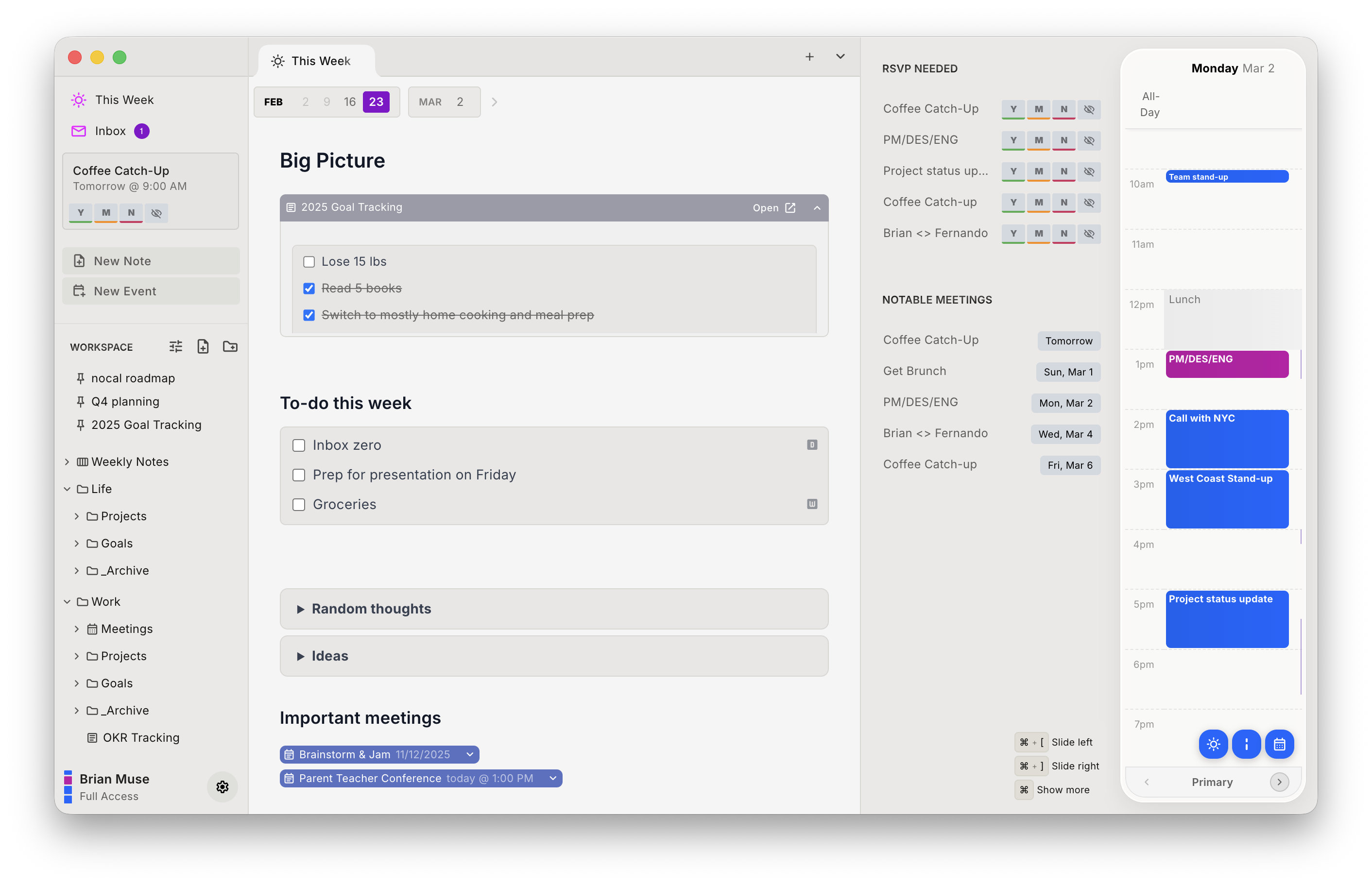
The pitch here is narrow: nocal connects to Google and Microsoft 365 directly, and the calendar works identically on Mac, Windows, iOS, and Android. No Apple Calendar in the middle, no platform where the feature quietly disappears.
Around that, the notes are markdown. Every meeting can carry a full note. Every week gets one weekly note that carries forward. Notes hold checklists, tables, and @-mentions that link another note or an event inline, live in folders and spaces with templates like PARA, and a single search covers your notes and your events at once.
On agents, both apps ship an MCP server, so the comparison is about scope rather than presence, and Craft's is the broader of the two. Craft's exposes documents, daily notes, tasks, and Collections, with create, update, and delete. nocal's exposes notes: search, read, create, and update, with conflict-safe writes. Neither reaches calendar events, which in Craft's case follows from the calendar being Apple's data rather than Craft's.
nocal is also free on Mac and Windows, permanently, with full Google and Outlook management and unlimited notes. Mobile is $4.99/mo, full access $9.99/mo.
| Strengths | Weaknesses |
|---|---|
| Direct Google and Microsoft 365, no Apple Calendar hop | Documents look nothing like Craft's. No cards, no design polish |
| Calendar works on Mac, Windows, iOS, and Android alike | No publishing to a public web page |
| Free desktop tier with unlimited notes | No whiteboards, no real-time collaboration |
| MCP server for agents, read and write | No Apple Calendar, iCloud, or CalDAV, and no Linux |
| Create and edit events, not just view them | Tasks are checkboxes in notes, not scheduled objects |
Pick nocal if you are on Google or Microsoft and at least one machine you use daily is not an Apple one. Skip it if what you make in Craft is documents other people read.
Or run both. A lot of Craft users end up here: keep Craft for documents worth showing, and let something else own the schedule.
Other options
If nocal is not the fit, these are the other options, including the two that connect to Apple calendars the way Craft does.
Morgen: best calendar coverage, including the Apple accounts
If your calendars are spread across Apple and everything else, Morgen is the only app here that connects to all of it directly: Google, Outlook/Microsoft 365, iCloud, Fastmail, and generic CalDAV, on Mac, Windows, Linux, iOS, Android, and web.
It has no notes at all, so it replaces Craft's calendar and none of the rest. For this audience that's often exactly right. It integrates tasks from eight other tools if you want them scheduled.
The objection is price: $30/mo, or $15/mo billed annually, coming from an app with a free tier.
Pick Morgen if you need iCloud and Windows, which is the combination nothing else here serves. More in the Morgen comparison.
NotePlan: best if you want daily notes as the main event
NotePlan is Craft's Calendar view as an entire product: daily and weekly notes, tasks with structured scheduling syntax, timeblocking, plugins and templates, calendar events alongside the writing.
Its calendar story is better than Craft's but still Apple-shaped. The web version connects to Google, iCloud, and Outlook directly, while the Mac and iOS apps read Apple Calendar the same way Craft does. Native apps are Mac, iPad, and iPhone only, and there's no free tier: $12/mo, or $8.33/mo billed yearly.
NotePlan fits if daily notes are your workflow and you're mostly on Apple hardware already. See the NotePlan comparison.
Notion Calendar: best free calendar to sit beside Craft
Free, native on Mac, Windows, iOS, and Android, and it connects to Google, Outlook, and Apple iCloud directly. It has no notes of its own. That's fine here: keep writing in Craft and let something free handle the schedule on every device.
Pick Notion Calendar if you want to keep Craft and simply stop relying on its calendar.
Obsidian: best if you want to own the files
The other direction entirely. Obsidian is free, stores plain markdown in a folder you control, and runs on Mac, Windows, Linux, iOS, and Android. Coming from Craft you'll find it plainer and more fiddly, and its calendar situation is worse than Craft's: nothing built in, only community plugins.
Choose Obsidian if vendor independence and plain-text ownership matter more to you than polish. More in the Obsidian comparison.
Switching from Craft to nocal
Your events don't move. nocal connects to the same Google and Microsoft accounts, just without asking Apple Calendar first.
- Install nocal on Mac or Windows and connect your Google or Microsoft account directly. The free desktop tier covers one account; merging several needs Full Access at $9.99/mo.
- Move the planning notes first: daily and weekly notes, meeting notes, anything time-shaped. That's the part of Craft that nocal is meant to replace.
- Rebuild scheduled tasks as checklists inside notes. Craft's schedule and deadline dates have no direct equivalent.
- Keep Craft for documents. There is no reason to migrate a well-made Craft document into a plainer app.
What does not come with you: Craft's document design, publishing, whiteboards, collaboration, and Collections. Also no Apple Calendar, iCloud, or CalDAV, and no Linux. If you have published Craft documents that people link to, those stay in Craft.
FAQ
Does Craft's calendar work on Windows? No. Craft's help centre states that calendar integration "is only available through Apple Calendar on Mac, iPhone, and iPad" and that it "is not available for the Windows or Web app." Craft's Windows app is fully native, but the calendar feature isn't part of it.
Does Craft connect to Google Calendar? Not directly. Craft's docs say Google Calendar and Outlook events "are supported indirectly: connect those accounts to Apple Calendar first, and they will appear in Craft automatically." So Craft reads them from Apple's calendar system rather than authenticating with Google or Microsoft itself, which is why the feature only exists on Apple devices.
Can I create or edit calendar events in Craft? No. The Calendar view lists events synced in from Apple Calendar and lets you attach an Event Note to one, but creating and editing the events themselves happens outside Craft. nocal, Morgen, Notion Calendar, and NotePlan can all create and edit events.
Which Craft alternative works on Windows and Android? nocal, Morgen, and Notion Calendar all have native Windows and Android apps with a working calendar. Craft has Windows and Android apps, but without the calendar. NotePlan has neither.
How much does Craft cost? There is a free tier limited to 1,500 content blocks, 1 GB of storage, and 15 AI credits per month. Plus is $10/month billed monthly or $96/year, Family is $18/month or $180/year for 2 to 6 accounts, and Team is $60/month or $600/year for up to 10 members.
Does Craft have an MCP server? Yes, and a good one. It exposes documents, daily notes, tasks, and Collections to Claude, ChatGPT, Cursor, Windsurf, VS Code, and Raycast with create, update, and delete access, scoped per space. Calendar access is not part of it. nocal's MCP server covers notes only, and does not reach calendar events either.
Is there a Craft alternative with better note-taking? That depends on what "better" means. Nothing here makes a document look better than Craft. For markdown notes tied to your schedule, nocal and NotePlan are stronger. For a plain-text vault you own outright, Obsidian is.
 Download for Mac
 Download for Windows
 Google Play Store