Obsidian Alternatives for Calendar and Planning (2026)
Obsidian has no built-in calendar and its plugins are uneven. Five alternatives for 2026, including which ones connect to Google and Microsoft directly.
Updated August 4, 2026
Obsidian is free, local-first, on every platform including Linux, and has 6,300+ plugins. Nothing here beats it as a knowledge base, and this page does not try to. What it does not have is a calendar. There is no official Google or Microsoft 365 connection, and the community plugins that add one range from actively maintained to archived. nocal is the option where the calendar is first-party and the notes are still markdown.
Your vault is the point. Local plain-text files you own outright, no vendor between you and your notes, Linux support, offline by default, core features like Canvas, Bases, and the graph view, and 6,300+ community plugins on top. nocal replaces none of that. It is a smaller, hosted, calendar-first app, and plenty of people should simply run both.
Obsidian users spot a pitch fast, so here is the deal on this one.
Obsidian is excellent. It's free, including for commercial use now, and it stores your notes as plain markdown files in a folder you control. It runs natively on macOS, Windows, Linux, iOS, and Android, and its community has published over 6,300 plugins and 660 themes. As a place to think and keep what you know, nocal doesn't replace it, and this page won't pretend otherwise.
There is exactly one thing Obsidian does not do, and it is the thing we do: your actual calendar.
At a glance
 ObsidianFree, including for work. Sync $4-8/mo; Publish $8/moNone built in. Community plugins only, no official Google or Microsoft supportMac, Windows, Linux, iOS, Android. No web appLocal markdown files you own; 6,300+ pluginsNone official
 nocalFree on desktop; $4.99/mo mobile; $9.99/mo fullGoogle, Microsoft 365/Outlook, first-partyMac, Windows, iOS, AndroidMarkdown, weekly note, note per meeting, @-mention linksNotes: search, read, create, update
 Morgen$30/mo, or $15/mo billed yearlyGoogle, Outlook/M365, iCloud, Fastmail, CalDAVMac, Windows, Linux, iOS, Android, webNone, but it schedules Obsidian tasksNone; REST API only
 NotePlanNo free tier. $12/mo, or $8.33/mo billed yearlyGoogle, iCloud, Outlook on web; Apple Calendar and CalDAV on Mac and iOSMac, iPad, iPhone. Web only on Windows and AndroidMarkdown, daily and weekly notes, pluginsNotes, tasks, calendar. macOS only
 Notion CalendarFreeGoogle, Outlook, Apple/iCloudMac, Windows, iOS, AndroidNone of its own. Surfaces Notion itemsNotion pages only, no calendarObsidian
- Price
- Free, including for work. Sync $4-8/mo; Publish $8/mo
- Calendar accounts
- None built in. Community plugins only, no official Google or Microsoft support
- Platforms
- Mac, Windows, Linux, iOS, Android. No web app
- Notes
- Local markdown files you own; 6,300+ plugins
- MCP server
- None official
nocal- Price
- Free on desktop; $4.99/mo mobile; $9.99/mo full
- Calendar accounts
- Google, Microsoft 365/Outlook, first-party
- Platforms
- Mac, Windows, iOS, Android
- Notes
- Markdown, weekly note, note per meeting, @-mention links
- MCP server
- Notes: search, read, create, update
Morgen- Price
- $30/mo, or $15/mo billed yearly
- Calendar accounts
- Google, Outlook/M365, iCloud, Fastmail, CalDAV
- Platforms
- Mac, Windows, Linux, iOS, Android, web
- Notes
- None, but it schedules Obsidian tasks
- MCP server
- None; REST API only
NotePlan- Price
- No free tier. $12/mo, or $8.33/mo billed yearly
- Calendar accounts
- Google, iCloud, Outlook on web; Apple Calendar and CalDAV on Mac and iOS
- Platforms
- Mac, iPad, iPhone. Web only on Windows and Android
- Notes
- Markdown, daily and weekly notes, plugins
- MCP server
- Notes, tasks, calendar. macOS only
Notion Calendar- Price
- Free
- Calendar accounts
- Google, Outlook, Apple/iCloud
- Platforms
- Mac, Windows, iOS, Android
- Notes
- None of its own. Surfaces Notion items
- MCP server
- Notion pages only, no calendar
Checked 3 August 2026 against each vendor's own pages: Obsidian pricing, Obsidian download, Obsidian community plugins, Morgen integrations, NotePlan pricing, Notion Calendar.
The Obsidian calendar situation
Obsidian ships no calendar, and there is no official way to connect a Google or Microsoft 365 account. Everything people use is a third-party community plugin. Here is the state of the ones that matter, because the plugin directory won't tell you which are still being looked after:
- Calendar (Liam Cain): 2.9M downloads, and the one most people mean. It's not what it sounds like, though: a month grid in the sidebar for navigating to daily and weekly notes. It does not show your meetings. Its repository was last pushed in mid-2024, carries 184 open issues, and its newest tagged release is a 2021 pre-release.
- Periodic Notes (Liam Cain): daily, weekly, and monthly notes with templates. Still widely used, but its latest tagged release is a 2022 beta and it has 166 open issues. Stale rather than abandoned.
- Full Calendar: reads events from your notes plus remote ICS and CalDAV feeds, read-only. The original is now archived in the community archive. An actively developed fork, Full Calendar Remastered, picks it up and adds two-way Google, Outlook, CalDAV, and Google Tasks. That means depending on a fork of an archived plugin.
- Google Calendar (YukiGasai): the closest thing to full integration, letting you create, edit, and delete events from inside Obsidian. Two catches. It requires you to create your own Google Cloud project and paste your own OAuth client ID and secret into the settings, and its own README says it "is in stale mode and could stop working at any time," with open issues reporting exactly that.
- Day Planner and Tasks: both well maintained, and the strongest part of the stack. Day Planner turns tasks into time blocks on a timeline. Tasks gives you due dates and recurrence.
This is not a knock on the authors, who maintain very good software for free. It is a description of what you are signing up for: the calendar layer of an Obsidian workflow is assembled from parts, some of which are unmaintained, and the best Google integration asks you to become a Google Cloud developer for an afternoon.
If that trade works for you, and plenty of Obsidian users are fine with it, you don't need an alternative. You need Day Planner and a Sunday afternoon.
Why choose nocal
nocal is a much smaller idea than Obsidian. It is a calendar app that took notes seriously, rather than a knowledge base that grew a calendar.
Your Google and Microsoft 365 accounts connect directly, with no plugin, no OAuth client of your own, and nothing to keep working. Every meeting can carry a full markdown note. Every week gets one weekly note that carries forward. Notes hold checklists, tables, and @-mentions that link another note or an event inline, sit in folders and spaces with templates like PARA, and one search covers your notes and your events together.
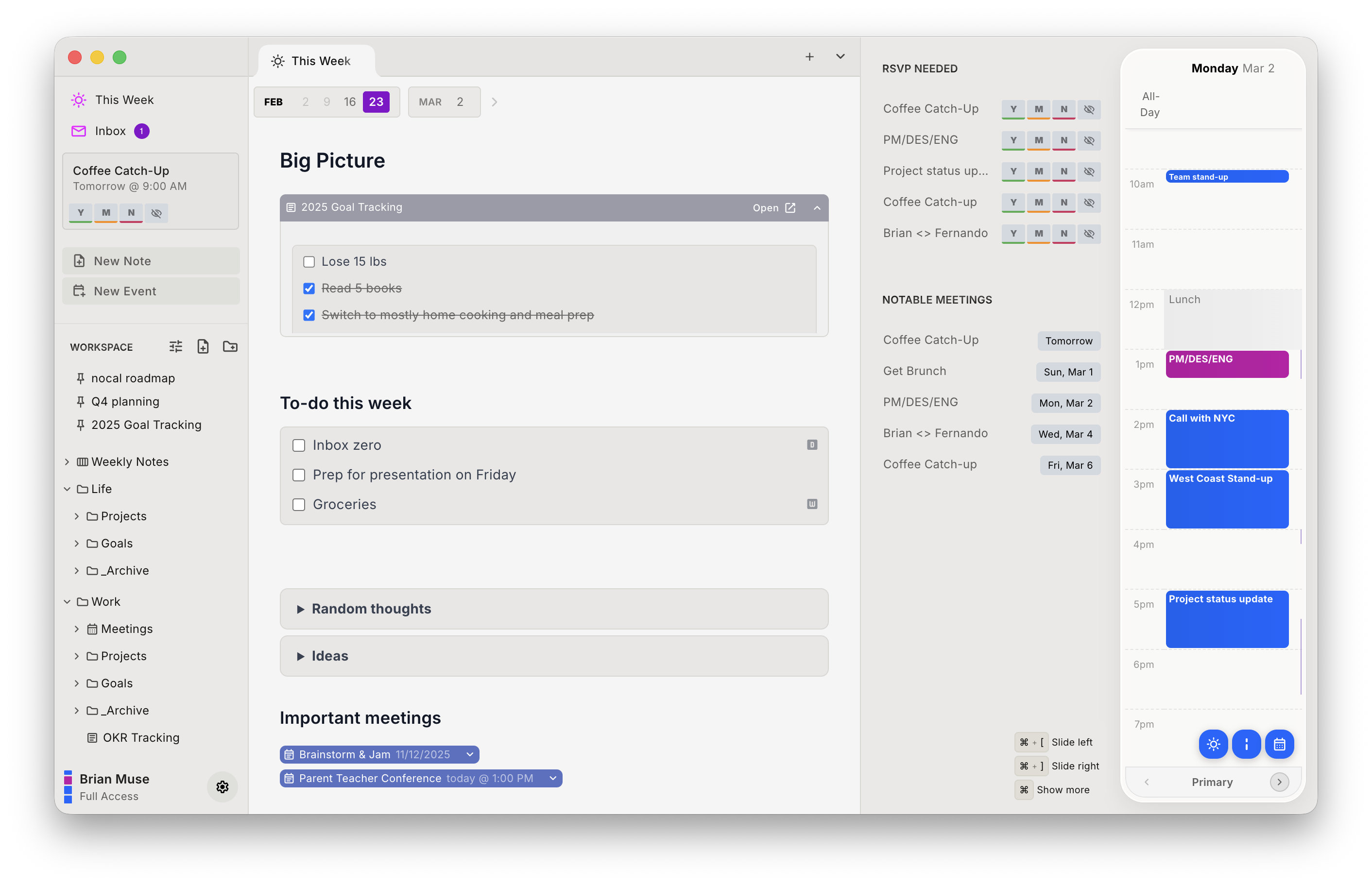
The other thing Obsidian users tend to care about: nocal ships a built-in MCP server, so Claude, ChatGPT, and Cursor can search, read, create, and conflict-safely update your notes. If you have been wiring an agent into your vault by pointing it at the filesystem, this is the same idea without the wiring. It covers notes rather than your calendar.
Here's the ledger, and it runs longer on the right-hand side than on any other page here:
| Strengths | Weaknesses |
|---|---|
| Google and Microsoft 365 connect first-party | Notes are hosted, not local files in your folder |
| Native Mac, Windows, iOS, and Android apps | No plugin ecosystem: 6,300 to zero |
| Free desktop tier with unlimited notes | No graph view, Canvas, Bases, or Dataview |
| Note attached to every meeting, one search over both | No Linux, and no iCloud or CalDAV |
| MCP server for agents, read and write | Mobile behind a paid tier |
Pick nocal if the calendar is the part of your system that keeps breaking, and your notes are meeting notes and weekly planning rather than a decade-deep vault. Skip it if local file ownership is non-negotiable, because that's a requirement we don't meet.
Or run both. This is the recommendation for most people reading this page, and it costs nothing: keep the vault for durable knowledge, use nocal for the calendar and the weekly note. Both are markdown, so moving text between them is copy and paste.
Other options
If nocal isn't the fit, and for plenty of Obsidian users it won't be, here are the other options, starting with the one that leaves your vault exactly where it is.
Morgen: best if you want to keep the vault and fix only the scheduling
The most direct answer to "I love Obsidian, I just need my calendar to work." Morgen has a genuine Obsidian integration: a local-only connection that lets you time-block Obsidian tasks and syncs the done date and status back, paired with its own Obsidian plugin.
So the vault stays exactly where it is, and you get the broadest calendar support in the category on top: Google, Outlook/Microsoft 365, iCloud, Fastmail, and CalDAV. Add a Linux desktop app, which matters to this audience more than most.
The price is the objection. $30/mo, or $15/mo billed annually, after a 14-day trial, when you are coming from something that is free.
Change nothing about Obsidian, bolt a serious calendar onto it: that's Morgen in one line. See the Morgen comparison for the fuller picture.
NotePlan: best if you want it all in one app on Apple hardware
NotePlan is the app Obsidian users most often move to when they get tired of assembling the calendar themselves: markdown notes, daily and weekly notes, tasks with real scheduling syntax, calendar events alongside, plugins and templates. It's built as one product rather than a plugin stack.
The catch is hardware and price. Native apps are Mac, iPad, and iPhone only, so Windows and Android get the web version, and there's no free tier at all: $12/mo, or $8.33/mo billed yearly. Coming from a free app that runs on Linux, that's two steps backwards at once.
Pick NotePlan if you are all-Apple and want one maintained product instead of a plugin stack. More detail on the NotePlan comparison.
Notion Calendar: best free calendar to sit beside your vault
Free, native on Mac, Windows, iOS, and Android, and it connects to Google, Outlook, and Apple iCloud. It has no notes of its own, which in this case is a feature: keep writing in Obsidian and let something free and well built handle the schedule.
The obvious limitation is that the two never meet. Your vault does not know about your calendar and your calendar does not know about your vault.
Pick Notion Calendar if you want a good free calendar next to Obsidian and are content for them to stay separate.
Craft: best if you want the documents to look good
Craft is the other polished notes app with a calendar view attached, and it is the prettiest place to write of anything here. There is a free tier capped at 1,500 content blocks, and Plus is $10/mo, or $8/mo billed yearly.
Its calendar is closer to Obsidian's situation than it looks. Craft's own docs say calendar integration "is only available through Apple Calendar on Mac, iPhone, and iPad" and "is not available for the Windows or Web app." Google and Outlook events arrive second-hand, and only on Apple devices. The Craft comparison has the detail.
If the documents themselves are the output and the calendar is just a convenience, Craft is the pick.
Moving from an Obsidian planning setup to nocal
Because this is Obsidian, the warning comes first: your notes stop being files in a folder you own. If that sentence stops you, it should, and you should stop here.
If it does not:
- Install nocal on Mac or Windows and connect your Google or Microsoft account. There is no plugin to configure and no OAuth client to create. The free desktop tier covers one account; merging several needs Full Access at $9.99/mo.
- Recreate your daily-note habit as the weekly note. It is the nearest equivalent and it is where nocal expects the week to live.
- Copy across only the notes that are about time: meeting notes, project status, weekly reviews. Markdown pastes cleanly in both directions.
- Leave the vault alone. Reference material, literature notes, and anything you have built with Dataview should stay in Obsidian, because nothing here replaces them.
What does not come with you: Dataview queries, Canvas, Bases, the graph view, plugins, and themes. Also no Linux, and no iCloud or CalDAV accounts.
FAQ
Does Obsidian have a built-in calendar? No. Obsidian ships no calendar and offers no official Google Calendar or Microsoft 365 connection. Calendar functionality comes entirely from third-party community plugins such as Calendar, Periodic Notes, Full Calendar, and Google Calendar, none of which are built by the Obsidian team.
What does the Obsidian Calendar plugin show? A month grid in the sidebar for navigating to your daily and weekly notes, not your meetings. Its own description is "display a monthly calendar in the sidebar to navigate and open daily and weekly notes." To see real calendar events you need a different plugin, such as Full Calendar or the Google Calendar plugin.
How do I sync Google Calendar with Obsidian? The main option is YukiGasai's community Google Calendar plugin, which can create, edit, and delete events but requires you to create your own Google Cloud project and enter your own OAuth client ID and secret. Its README states it is in stale mode and could stop working at any time. Full Calendar Remastered is an actively maintained alternative. If you would rather not maintain that, nocal and Morgen both connect to Google directly as a first-party feature.
Is Obsidian free for commercial use? Yes, as of 2026 it is. The commercial license is now optional: Obsidian's pricing page says you are not required to pay for one, though they encourage organisations to buy it at $50 per user per year to support the project. Sync ($4-8/mo) and Publish ($8/mo) remain separate paid add-ons.
Is there an Obsidian alternative with a built-in calendar? Yes. nocal connects to Google and Microsoft 365 first-party and attaches markdown notes to events, and NotePlan does the same on Apple hardware. Morgen is the option that leaves Obsidian in place and adds the calendar beside it, including scheduling your Obsidian tasks.
Can I keep my notes as local files? Not in nocal. Notes are hosted, not plain files in a folder you control. This is the single biggest thing you give up leaving Obsidian, and for many people it's reason enough to stay. Morgen is the alternative that preserves it, since your vault never moves.
Does anything here run on Linux? Obsidian and Morgen do. nocal, NotePlan, Notion Calendar, and Craft do not.
Can AI agents read my notes and calendar? nocal ships a built-in MCP server, so Claude, ChatGPT, and Cursor can search, read, create, and update notes, with conflict-safe writes. It covers notes, not calendar events. With Obsidian, agents typically reach the vault through the filesystem or a community plugin instead, and the calendar is not part of that picture.
 Download for Mac
 Download for Windows
 Google Play Store