NotePlan Alternatives: 5 Options Compared for 2026
NotePlan has no free tier and no native Windows or Android app. Five alternatives for 2026, with prices, calendar support, and platforms.
Updated August 4, 2026
NotePlan is the closest thing to nocal in concept: markdown notes, daily and weekly notes, and a calendar in one app. The reason to leave is almost always hardware. NotePlan's native apps are Mac, iPad, and iPhone only, so on Windows or Android you are in a browser. nocal ships native apps on all four platforms, talks to Google and Microsoft 365 directly, and its desktop tier is free.
You work on Apple hardware and you lean on NotePlan's plugins, templates, or themes. Its plugin and template ecosystem is deeper than nocal's, its task syntax is more expressive, and it reads Apple Calendar, Apple Reminders, Exchange, and CalDAV, none of which nocal supports. If you also need iCloud calendars, nothing on this page beats staying put except Morgen.
Of everything compared on this site, NotePlan is the app whose idea is closest to ours. Markdown notes, a daily note for every day, a weekly note above it, tasks written inline, and your calendar sitting right there next to the writing. If you are using NotePlan and it fits, you have already accepted the premise.
So people rarely leave NotePlan over the concept. They leave over hardware, or over the bill.
At a glance
 NotePlanNo free tier. $12/mo, or $8.33/mo billed yearlyGoogle, iCloud, Outlook on web; Apple Calendar, Reminders, Exchange, CalDAV on Mac and iOSMac, iPad, iPhone. Web only on Windows and AndroidMarkdown, daily and weekly notes, plugins and templatesNotes, tasks, calendar. macOS only
 nocalFree on desktop; $4.99/mo mobile; $9.99/mo fullGoogle, Microsoft 365/OutlookMac, Windows, iOS, AndroidMarkdown, weekly note, note per meeting, @-mention linksNotes: search, read, create, update
 Morgen$30/mo, or $15/mo billed yearlyGoogle, Outlook/M365, iCloud, Fastmail, CalDAVMac, Windows, Linux, iOS, Android, webNone; integrates 8 task toolsNone; REST API only
 Notion CalendarFreeGoogle, Outlook, Apple/iCloudMac, Windows, iOS, AndroidNone of its own. Surfaces Notion itemsNotion pages only, no calendar
 Amie$25/mo, or $20 billed yearly. Only paid plans listedGoogle accounts; Outlook only via its Apple Calendar integrationMac, Windows, iPhone. No AndroidAI meeting recording and transcriptsCalendar, todos, contacts, notesNotePlan
- Price
- No free tier. $12/mo, or $8.33/mo billed yearly
- Calendar accounts
- Google, iCloud, Outlook on web; Apple Calendar, Reminders, Exchange, CalDAV on Mac and iOS
- Native apps
- Mac, iPad, iPhone. Web only on Windows and Android
- Notes
- Markdown, daily and weekly notes, plugins and templates
- MCP server
- Notes, tasks, calendar. macOS only
nocal- Price
- Free on desktop; $4.99/mo mobile; $9.99/mo full
- Calendar accounts
- Google, Microsoft 365/Outlook
- Native apps
- Mac, Windows, iOS, Android
- Notes
- Markdown, weekly note, note per meeting, @-mention links
- MCP server
- Notes: search, read, create, update
Morgen- Price
- $30/mo, or $15/mo billed yearly
- Calendar accounts
- Google, Outlook/M365, iCloud, Fastmail, CalDAV
- Native apps
- Mac, Windows, Linux, iOS, Android, web
- Notes
- None; integrates 8 task tools
- MCP server
- None; REST API only
Notion Calendar- Price
- Free
- Calendar accounts
- Google, Outlook, Apple/iCloud
- Native apps
- Mac, Windows, iOS, Android
- Notes
- None of its own. Surfaces Notion items
- MCP server
- Notion pages only, no calendar
Amie- Price
- $25/mo, or $20 billed yearly. Only paid plans listed
- Calendar accounts
- Google accounts; Outlook only via its Apple Calendar integration
- Native apps
- Mac, Windows, iPhone. No Android
- Notes
- AI meeting recording and transcripts
- MCP server
- Calendar, todos, contacts, notes
Checked 3 August 2026 against each vendor's own pages: NotePlan pricing, NotePlan on Exchange, Outlook and CalDAV, Morgen, Notion Calendar, Amie.
Give NotePlan its due first
Here is what you give up by leaving, and it is longer than most competitors admit to:
- Calendar breadth. Apple Calendar and Apple Reminders natively, plus Exchange and generic CalDAV through macOS. nocal reads Google and Microsoft 365 and nothing else.
- Plugins and templates. A plugin ecosystem and a templating system people build their workflows on. nocal has neither today.
- Task syntax. Scheduling a task by typing
>date, rescheduling it, and setting repeat rules is more expressive than writing checkboxes in a note, which is what nocal asks of you. - Timeblocking from tasks. Drag a task onto the timeline and it becomes a block. nocal proposes focus blocks from your week and lets you attach tasks to one, but there is no drag-a-task-onto-the-day gesture.
- Themes. A community theme library, and NotePlan's own look is excellent.
If two or more of those are load-bearing, stop reading. You are not going to be happier somewhere else.
The actual reason people look: platforms
NotePlan's pricing page is explicit that a plan covers "Mac, iPad, iPhone, and Web." There is no native Windows app and no Android app. The web version is good. In the last year it gained direct Google, iCloud, and Outlook calendar logins, so a Windows or Android user is not locked out.
But a browser tab is not the same product. No offline desktop app, no OS-level integration, no phone app on Android at all. If you get issued a Windows laptop, or you carry an Android phone, the app you fell in love with on your Mac is not the app you now have.
You may also see "NotePlan for Windows" on third-party download sites. Those are WebCatalog-style wrappers around the web app, not something NotePlan ships.
Why choose nocal
nocal is the same bet as NotePlan: notes and calendar in one app, markdown, a weekly note that carries the thread of the week, tasks living inside notes rather than in a separate system. The differences are in the plumbing.
Native apps on Mac, Windows, iOS, and Android. Not a wrapper, not a web view. This is the whole reason a NotePlan user ends up here.
Direct connections to Google and Microsoft 365. nocal authenticates with the provider itself rather than reading the calendar database of the OS, so a Microsoft 365 work account behaves the same on a Windows desktop as it does on an Android phone. NotePlan's Mac and iOS apps get non-Apple calendars by way of Apple Calendar, which is why the Windows story is what it is.
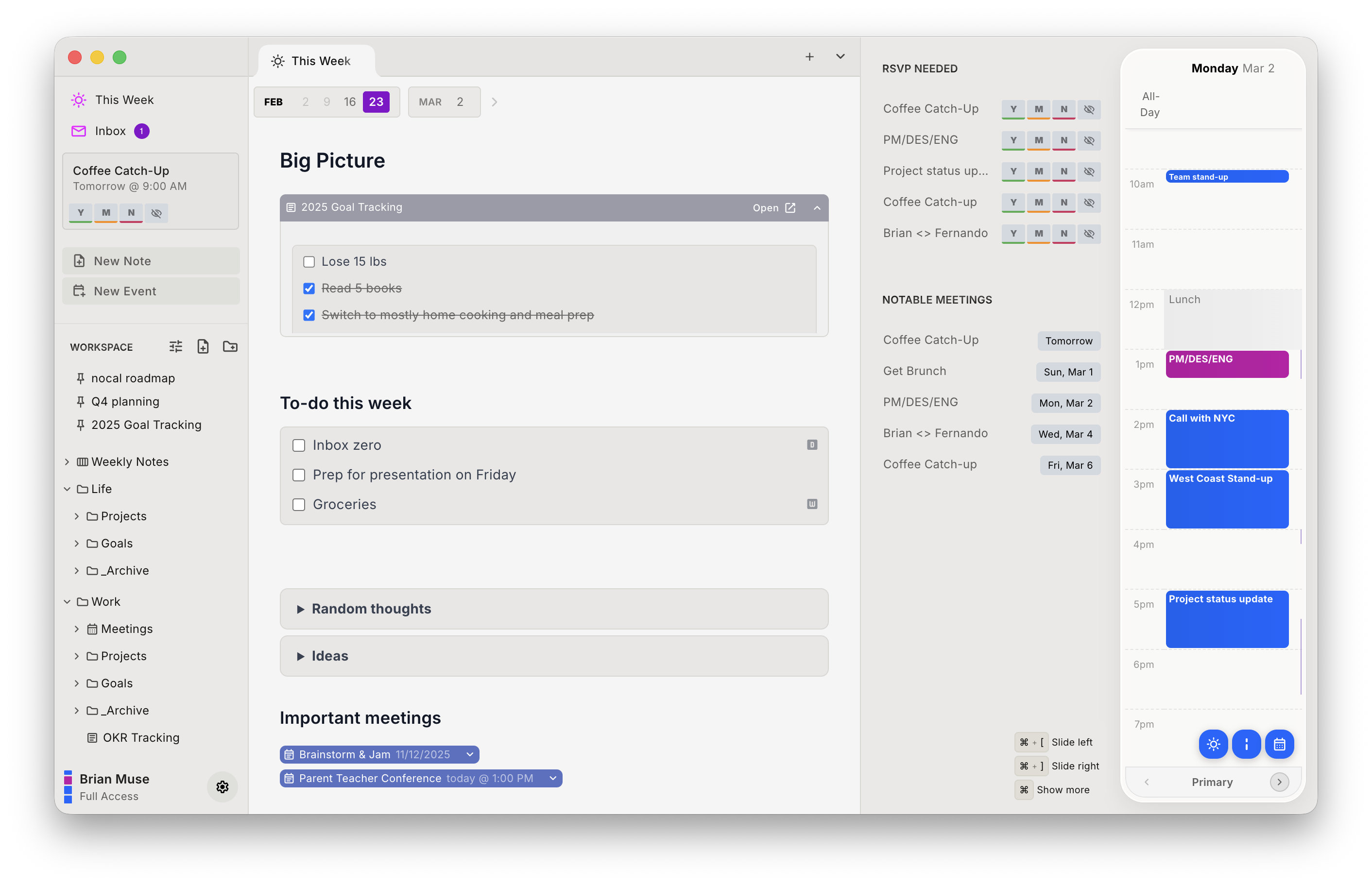
Agents are the other place these two differ, though not the way you might expect. nocal ships a built-in MCP server, so Claude, ChatGPT, and Cursor can search, read, create, and conflict-safely update your notes. NotePlan shipped one in March 2026 that goes further, reaching tasks, calendar events, Reminders, and even plugins. The catch is that it runs on macOS only and wants Node and an npx config edit; ours is built in and works from whichever platform you are on. nocal also scores incoming invites for spam and lets you delete a bad one without notifying the sender.
On price the gap is stark. NotePlan has no free tier at all, only a 7-day trial on the annual plan or 3 days on monthly. nocal's desktop tier is free permanently on Mac and Windows, with full Google and Outlook management and unlimited notes. Mobile is $4.99/mo and full access $9.99/mo.
| Strengths | Weaknesses |
|---|---|
| Native Mac, Windows, iOS, and Android apps | No Apple Calendar, iCloud, Exchange, or CalDAV |
| Free desktop tier, permanently, no trial clock | No plugin ecosystem or templating language |
| Direct Google and Microsoft 365 authentication | No Apple Reminders integration |
| Built-in MCP server, no Node setup, any platform | Tasks are checkboxes in notes, not a task syntax |
| Note attached to every meeting, one search over both | No Linux, mobile behind a paid tier |
Pick nocal if your calendars are on Google or Microsoft and at least one device you use every day is not made by Apple. Skip it if Apple Reminders or an iCloud calendar is in your daily loop.
Other options
If nocal is not the fit, these are the other apps NotePlan users move to, including the two that still cover Apple calendars.
Obsidian: best if you want to own the files
The other markdown app NotePlan users weigh, and the one with the strongest claim on your data: plain files in a folder you control, on every platform including Linux and Android, and free including for work.
The trade is the calendar. Obsidian has none built in, and the plugins that add one are community-maintained. That is a different kind of ownership. You own the files, and you also own the maintenance.
Obsidian fits if vendor independence matters more than having someone else own your calendar. There is a fuller comparison on the Obsidian alternatives page.
Morgen: best if you need iCloud and Linux too
If what you liked about NotePlan was the calendar breadth, Morgen is the only thing here that widens it rather than narrowing it: Google, Outlook/Microsoft 365, iCloud, Fastmail, and generic CalDAV, plus the category's only Linux desktop app.
It has no notes at all, so it is a replacement for half of NotePlan. It integrates tasks from eight other tools, including Obsidian, which is the usual way people rebuild the whole workflow.
It is also the most expensive option here at $30/mo, or $15/mo billed annually.
Morgen makes sense if you need iCloud or CalDAV and are willing to keep notes somewhere else.
Notion Calendar: best free calendar if the notes move to Notion
Free, native on Mac, Windows, iOS, and Android, and it connects to Google, Outlook, and Apple iCloud. That is broader provider support than nocal offers.
It has no notes or tasks of its own. It displays Notion database items beside your events, and Notion's FAQ confirms that runs one way only. So this is the option where the notes half of NotePlan becomes Notion.
If you would rather pay nothing and keep the writing in Notion, Notion Calendar is the one to try.
Amie: best if meetings are the point
Amie records, transcribes, and summarises meetings without sending a bot into the call, and it is the best-looking app in the category. If your daily notes are mostly meeting notes, it writes them for you.
Coming from NotePlan the calendar support will feel narrow: Google accounts, with Outlook reachable only "through our Apple Calendar integration," and no Android app. Only paid plans are listed: $25/mo, or $20 billed yearly.
Pick Amie if the notes you care about are meeting notes.
Switching from NotePlan to nocal
Your events do not move. Both apps are clients on top of calendar accounts you already have.
- Install nocal on Mac or Windows and connect your Google or Microsoft account. The free desktop tier covers one account; merging several needs Full Access at $9.99/mo.
- Start with the weekly note. It is the closest analogue to how you already work in NotePlan, and it is the habit the rest hangs off.
- Move templates by hand. There is no template importer, and nocal's spaces use methodology templates like PARA rather than a template language.
- Attach notes to recurring meetings as they come up rather than migrating history in one pass.
Three things to plan for. iCloud, Apple Calendar, Exchange, and CalDAV accounts cannot be connected. If any calendar you rely on is Apple-hosted or Exchange-only, nocal cannot see it. Apple Reminders do not come across. And plugins have no equivalent. If your NotePlan workflow is a plugin workflow, this is a downgrade, and it is better to know that before you move.
Your notes themselves travel well. Both apps are markdown, so the writing survives the trip even though the scaffolding around it does not.
FAQ
Does NotePlan have a Windows app? No. NotePlan's pricing page lists "Mac, iPad, iPhone, and Web," so on Windows you use the web version. Downloads advertised elsewhere as a NotePlan Windows app are third-party wrappers around that web version. nocal, Morgen, and Notion Calendar all ship native Windows apps.
Does NotePlan have an Android app? No. There are native apps for Mac, iPad, and iPhone only, with a web version everywhere else. Among the alternatives here, nocal, Morgen, and Notion Calendar have native Android apps. Amie does not.
Is there a free alternative to NotePlan? Yes. NotePlan itself has no free tier, only a 7-day trial on the annual plan or 3 days on monthly. nocal is free permanently on Mac and Windows with full Google and Outlook management and unlimited notes, Notion Calendar is free, and Obsidian is free for any use, including commercial.
How does NotePlan connect to Google Calendar? On the web version, you log in with Google directly, and iCloud and Outlook logins were added the same way. On Mac and iOS it goes through Apple's calendar system, so a Google, Exchange, or CalDAV account is added in the macOS or iOS Calendar settings first and NotePlan reads it from there.
Which NotePlan alternative also has notes and a calendar in one app? nocal is the closest match. Markdown notes, a weekly note, a note attached to each meeting, and your Google and Microsoft calendars on one timeline, all with native apps on Mac, Windows, iOS, and Android. Obsidian can be assembled into something similar with community plugins.
Can I keep my markdown notes if I switch? Largely, yes. NotePlan and nocal both store notes as markdown, so prose, headings, lists, and links carry over. What does not carry over is NotePlan-specific scaffolding: >date task scheduling, plugin-generated content, and templates all need rebuilding.
Do any of these let AI agents read my notes and calendar? Most of them. nocal's built-in MCP server covers notes: search, read, create, and update, with conflict-safe writes. It does not expose calendar events. NotePlan's, added in March 2026, covers notes, tasks, calendar events, and Reminders, but runs on macOS only. Morgen ships none first-party.
 Download for Mac
 Download for Windows
 Google Play Store