nocal v4.2: Your calendar has ideas
nocal 4.2 introduces Ideas — suggestions that scan your day for focus time, flag meetings worth skipping, and place focus blocks, lunch, and ramp-up time around what stays. Plus task-linked focus blocks and a refreshed event form.
Today we are releasing nocal v4.2.
The headline of this release is Ideas: a new layer of nocal that scans your week for ways to open up focus time and lets you act on them one at a time. 4.2 also adds task-linked focus blocks and ships a cleaner, faster event form.
Ideas
Most calendar apps let you see your week. They do not have an opinion about it. 4.2 changes that.
Ideas reads your upcoming days and surfaces specific, accept-or-skip suggestions for opening up time to think:
- Skip a meeting. Ideas flags meetings you could decline — recurring ones with low signal, optional attendances, conflicts you have not resolved — and lets you decline in one tap.
- Move a meeting. When a small shift would unlock a bigger focus block, Ideas proposes the move. You see the new slot, accept it, and the invite updates.
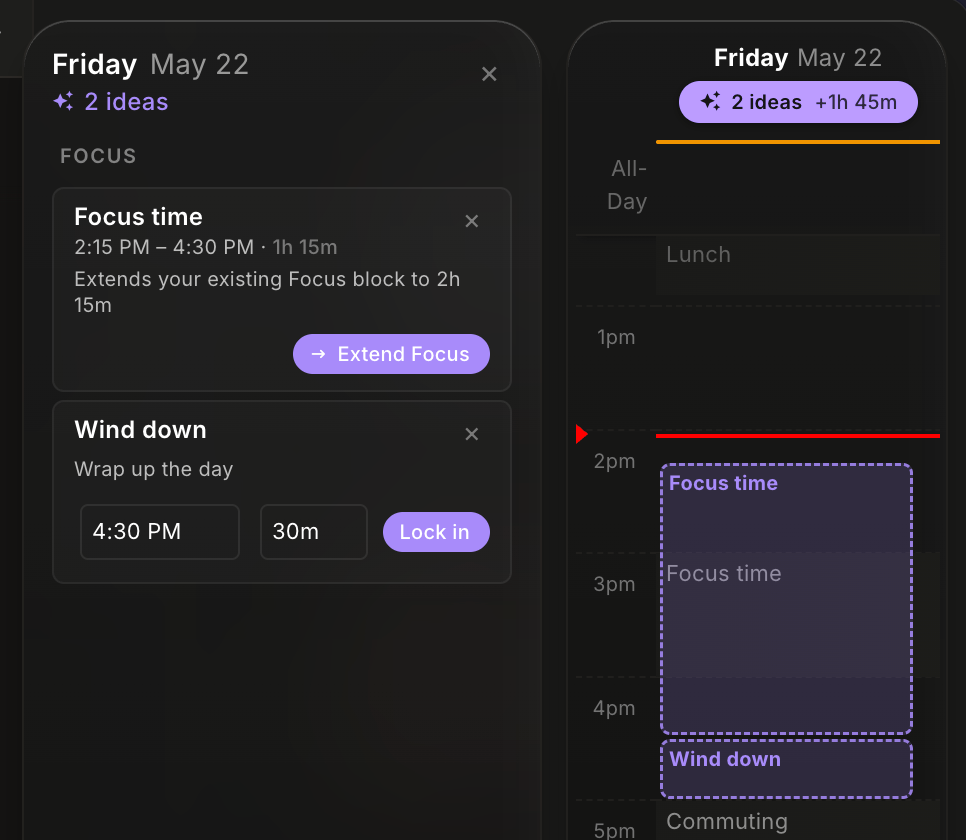
- Add a focus block. Around the meetings you keep, Ideas places focus blocks where they actually fit — and offers lunch, ramp-up, and wind-down blocks to protect the edges of your day.
Each suggestion comes with the reason it was suggested and an estimate of how much focus time it returns. You can accept, nudge (shift the proposed time), or skip any idea individually. Nothing changes on your calendar until you accept.
- Desktop Open Ideas from the calendar to scan suggestions across the whole week
- Mobile Find Ideas right on your Home screen
Why this matters: we have written a lot about calendar debt and time confetti — the slow accumulation of meetings whose justification has expired, and the fragmentation of the day into pieces too small to think in. Ideas is the first release where nocal actively pushes back against both. It does not refactor your calendar without permission. It hands you a short list of moves, ordered by impact, and lets you decide.
Link tasks to focus time
The other change in 4.2 is small in surface area and large in feel.
When you create a focus block — manually or by accepting an Idea — you can now pick the tasks you intend to work on. The selected tasks are added to the focus block's note, so when you sit down to focus, you open the event and find exactly the work you committed to.
This closes a loop that has been frustrating us for a while: focus blocks tell you when to focus, but until now the what lived somewhere else. 4.2 puts them in the same place.
A cleaner event form
We took a pass at the event form across desktop and mobile. The result:
- A cleaner layout with the controls reorganized around how you actually fill an event out
- A live preview of the event's attached note inside the form, so you can see context without opening the note
- Mobile The recurrence picker is now a smoother bottom-sheet flow
- Mobile More pickers open as bottom sheets, for easier one-handed use
The event form is the most-touched surface in nocal. The 4.2 pass is the largest cleanup we have done to it since the app launched.
Available now
4.2 is rolling out across desktop, iOS, and Android.
The through-line of this release: your calendar should help you protect the time you actually need to think. Ideas is the first version of that, task-linked focus blocks make the time itself useful, and the event form cleanup makes the everyday flow lighter. More soon.
 Download for Mac
 Download for Windows
 Google Play Store